API Reference
Delinea Credentials Cache provides a RESTful API for authentication, credential retrieval, and cache management. The same endpoints are available whether the service is installed on Windows, installed on Linux, or deployed as a Docker container. Swagger UI is published as part of the package, so you can explore and test each endpoint directly from a browser.
The API has three endpoints:
-
Token Generation – Authenticates a user with the vault and returns an access token.
-
API Credential by ID – Retrieves a secret, caching it for the configured time-to-live.
-
Refresh Secret on Change Event – Updates the cache when a secret changes, called by Event Pipeline scripts.
Accessing Swagger UI
Swagger UI is an interactive web page that documents the API and lets you execute test requests without writing code. Use it to validate an installation, troubleshoot API issues, and become familiar with the API before integrating it into your applications.
Open the following URL in a browser:
https://{ServerName}/{installedFolderDirectory}/swagger/index.html
Replace {ServerName} with your server name and {installedFolderDirectory} with the IIS application alias or proxy path of your installation (for example DelineaCredCache). For a Docker deployment, use the mapped host port instead, for example http://{hostname}:8083/swagger.
Confirm:
-
The Swagger page loads.
-
API endpoints are visible.
-
An Authorize button exists.
If Swagger does not load, check the hosting logs. On Windows, open Event Viewer > Windows Logs > Application; errors there commonly indicate an IIS binding or path mismatch or an ASP.NET Core hosting issue. On Linux, run sudo journalctl -u credcache.service for the application output and check the Apache HTTP Server error log (/var/log/apache2/error.log on Ubuntu, /var/log/httpd/error_log on RHEL) for proxy errors. On Docker, run docker logs delinea-credential-cache. See also Troubleshooting.
Swagger Authorization
Before using the protected endpoints, you must authorize with a Bearer token obtained from the Token Generation endpoint.
-
Open Swagger UI.
-
Select Authorize.
-
Enter:
Bearer <access_token> -
Select Authorize, then select Close.
Endpoints
Token Generation
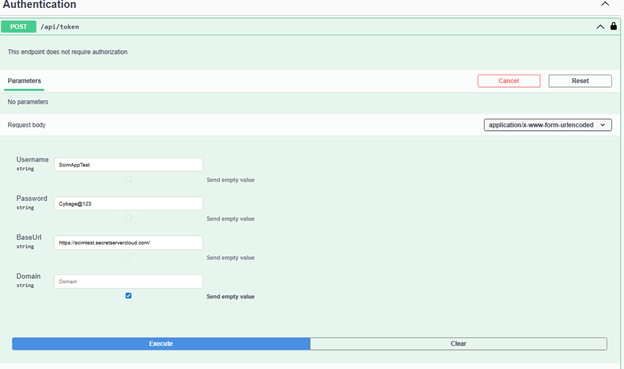
The Token Generation endpoint is the entry point for all API interactions. It accepts your vault username, password, base URL, and optional domain, authenticates with the vault, and returns a Bearer token that you use to authorize subsequent calls.
Endpoint
POST /api/token
Authorization
Not required
Request Content-Type
application/x-www-form-urlencoded
Request Parameters
| Name | Type | Required | Description |
|---|---|---|---|
| Username | string | Yes | Vault username (Secret Server application account or Delinea Platform client ID) |
| Password | string | Yes | Vault user password (or Delinea Platform client secret) |
| BaseUrl | string | Yes | Base URL of Secret Server or of the Delinea Platform tenant |
| Domain | string | No | Domain name (if applicable) |
Expected Result
-
200 OK with the token in the response body
Example (PowerShell)
$body = @{
    Username = "<username>"
    Password = "<password>"
    BaseUrl  = "https://<secret-server-host>/SecretServer"
    Domain   = "<domain>"   # optional
}

$response = Invoke-RestMethod `
    -Method Post `
    -Uri "https://localhost/DelineaCredCache/api/token" `
    -ContentType "application/x-www-form-urlencoded" `
    -Body $body

$response
API Credential by ID
The API Credential by ID endpoint is the core function of Delinea Credentials Cache. When an application needs a secret, it calls this endpoint with the Secret ID. The cache fetches the secret from the vault and stores it locally for the configured time-to-live (CredCacheExpirationInMinutes, 10 minutes by default; see Configuring Delinea Credentials Cache). Subsequent requests for the same secret within that period are served from the cache, which reduces API calls to the vault and improves application performance.
Endpoint
GET /api/credential/{id}
Authorization
Required (Bearer token)
Path Parameters
| Name | Type | Required | Description |
|---|---|---|---|
| id | int | Yes | Secret ID in the vault |
Query Parameters
| Name | Type | Required | Description |
|---|---|---|---|
| autoComment | string | No | Optional audit or log comment |
Sample Request
GET /api/credential/1234?autoComment=Fetched+by+App
Authorization: Bearer <access_token>
Expected Result
-
200 OK – Credential retrieved successfully
Refresh Secret on Change Event
The Refresh Secret on Change Event endpoint keeps cached credentials synchronized with the vault when passwords or other secret values change. Rather than waiting for the cache entry to expire, an Event Pipeline in Secret Server or the Delinea Platform runs a PowerShell script that calls this endpoint with the changed Secret ID. The endpoint validates the request, fetches the updated secret from the vault, and updates or inserts it in the local cache immediately. You control which secrets trigger a refresh by adding secret filters to the Event Pipeline policy. See Event-Driven Secret Refresh.
Endpoint
POST /api/secretchanged
Authorization
Required (Bearer token)
Request Content-Type
application/json
Request Body
{
  "secretId": "1234"
}
Request Parameters
| Name | Type | Required | Description |
|---|---|---|---|
| secretId | string | Yes | Secret ID that changed |
Sample Request
POST /api/secretchanged
Authorization: Bearer <access_token>
Content-Type: application/json

{
  "secretId": "1234"
}
Expected Result
-
202 Accepted
To confirm the refresh occurred: enable logging (see Configuring Delinea Credentials Cache) and verify that the latest log entries show the secret retrieval and cache update for the specified Secret ID, as described in Verifying the Deployment.


