Amazon IAM Console Secret Template for RPC
Overview
This document briefly discusses using Secret Server Remote Password Changing (RPC) for Amazon IAM Console accounts. With Remote Password Changing (RPC), secrets can automatically change remote account passwords when a secret expires, either immediately or on a defined schedule. In addition, the new passwords’ strengths and other qualities are completely configurable. See the Password Changer List for a complete list of available password changers.
Configuring Amazon IAM
Secret Server can scan Amazon Web Services (AWS) for accounts that can access the cloud resource. Secrets based on the “AWS Console Account” secret template can be discovered and managed through the Secret Server.
You can change passwords and access unique passwords for the password secrets in the Amazon IAM console. An Amazon IAM Key should be connected to an “Amazon IAM Console Password“ secret to enable password modification. For details, see Password Management in AWS.
AWS GovCloud Support
The Amazon IAM Console Password secret template has no Region field. Password changes for this secret type always go through a linked account (an Amazon IAM Key secret), so that linked secret's Region field is what determines the AWS partition used, for both basic and privileged password changes:
-
Blank (default) on the linked Key secret: Secret Server uses the commercial AWS partition. No changes are needed for existing secrets.
-
us-gov-west-1orus-gov-east-1on the linked Key secret: Secret Server uses the AWS GovCloud (US) partition.
If the linked Key secret's Region field contains any other value, the operation fails immediately with an error. It never falls back to the commercial partition.
aws-cn) is not supported.Assigning a Password Changer to a Secret Template
Remote Password Changing (RPC) provides pre-configured password changers assigned to specific secret templates available out of the box. You can view and modify secret templates in the Secret Server administration panel. All possible modification options for secret templates are described in Creating or Editing Secret Templates. Ensure that the secret template is active. For details, see Activating and Deactivating Templates.
To navigate to an Amazon IAM Console secret template:
-
Search for Secret Templates. The Secrets Administration page is displayed.
-
In the Core Actions section, click Secret Templates. The list of available templates is displayed.
-
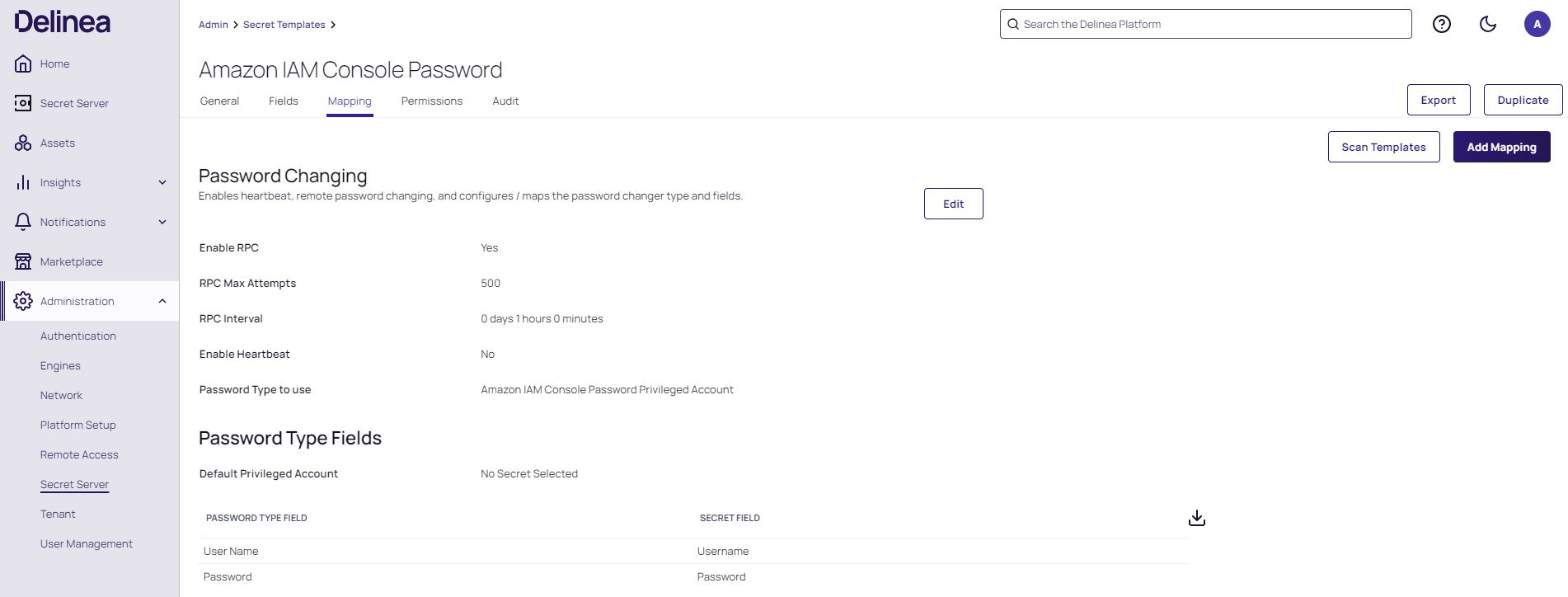
Select an Amazon IAM Console secret template and then click the Mapping tab.
You can check what secret template conforms to the selected RPC. The screenshot below shows that the Amazon IAM Console Password Privileged Account RPC conforms to the identically titled secret template. It is possible to assign several password changers to one secret template. For more information, see Assigning a Password Changer to a Secret Template.
Secret templates determine the fields, launchers, and the remote password changer for secrets. To use the Amazon IAM Console template on a secret, see Managing Secrets.