Troubleshooting
-
To troubleshoot integration issues, please follow these instructions:
-
Run the SetUpUtility. For more information, see Run the SetUpUtility.
-
The SetupUtility encrypts the Secret Server or Delinea Platform credentials and creates the DelineaDriver.properties in the current folder and copies Delinea-Jdbc-Proxy.jar and DelineaDriver.properties into the web application’s lib folder.
-
Verify if the DelineaDriver.properties was copied into the web application’s lib folder.
-
Verify that the logLevel parameter is set to level 3, because the above 3 log types will get printed with additional debug log.
-
The application account should have View Secret permission. The secret created in Secret Server should have application account permission.
-
Verify that the username and password of the secret is the same as your database name.
-
The secret server application account user should not be locked out.
-
SecretServer - getSecret: error=javax.net.ssl.SSLHandshakeException: PKIX path building failed:unable to find valid certification path to requested target.
-
Solution: Check your DelineaDriver.properties file trustAllCertificate parameter to see if it is false, set it as true. Setting it to true is not secure.
-
-
Check the error in server.log in JBOSS_HOME\standalone\log\server.log.
If you enter the wrong Secret Server credentials and don’t provide the user permission to the secret and then try to connect with your database, you will get an error that says, Access Denied or Authentication fail in the in server.log.
Troubleshooting of the Server Integration
-
Check for errors in the SystemOut.log located at: C:\ProgramFiles\IBM\WebSphere\AppServer1\profiles\AppSrv01\logs\server1
-
If the credentials for the Delinea Platform or Secret Server are incorrect, or if the application account does not have the appropriate permissions to access the secret, an Access Denied or Authentication Fail error will be logged in the
SystemOut.logwhen trying to connect to the database. -
Verify that users in the Delinea Platform or Secret Server application account are not locked out.
If you put the wrong credentials for Secret Server and do not provide permission for the secret and then try to connect with your database, an error will occur, Access Denied or Authentication fail in SystemOut.log.
If the system BIOS has been changed or updated, the setup utility needs to be re-run.
-
Users need to restart the WebSphere service if the Secret password is updated in Secret Server in case of a Data Source connection.
-
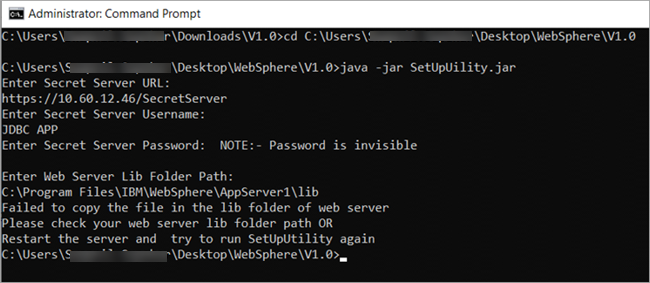
If the following error occurs while running SetupUtility, it means the WebSphere service is running OR Unable to find the location.
-
If the following error occurs in the WebSphere SystemOut.log file :
-
DelineaDriver: Could not register driver
Solution: Check all parameters in the DelineaDriver.properties file**.* -
DelineaDriver: Unable to read the DelineaDriver.properties file.
Solution: Check to see if the name of the file is DelineaDriver.properties and the parameter is present in the configuration. -
DelineaDriver: URL is not valid. The URL must begin with
jdbc:delinea:SSID.
Solution: Check the connection string in the Java application configuration file.If you use SQL Server, the URL must be
jdbc:sqlserver:SSID://localhost:1433;databaseName=onlinebookstore. If you use the JDBC Proxy URL, it must be:jdbc:delinea:SSID:sqlserver://localhost:1433;databaseName=onlinebookstore.
-
-
SecretServer - getSecret: error getting secret, status
Solution: Check your Secret ID in your Java application configuration file. It should be present in front of the Database username box. -
SecretServer - getSecret: error=javax.net.ssl.SSLHandshakeException: com.ibm.jsse2.util.j: PKIX path building failed: This error typically indicates that the system can't verify the SSL certificate chain during a secure connection attempt. This issue can occur in both Secret Server and Delinea Platform, especially if the server's SSL certificate isn't trusted by the Java environment.
-
Solution for Secret Server:
-
Check the
trustAllCertificateparameter in yourDelineaDriver.propertiesfile. If it is set to false, change it to true to bypass certificate validation. However, note that setting trustAllCertificate=true makes the connection less secure as it allows all certificates, including potentially untrusted ones.Copyproperties
trustAllCertificate=true
-
-
Solution for the Delinea Platform:
-
The same solution applies for Delinea Platform. The trustAllCertificate setting in the
DelineaDriver.propertiesfile should be checked. If the parameter is set tofalse, change it totrue.
-
-
-
However, it's important to note that while setting trustAllCertificate=true will resolve SSL handshake issues by trusting all certificates, it reduces security and should only be used temporarily, or in environments where you are sure of the trustworthiness of the certificates.?
-
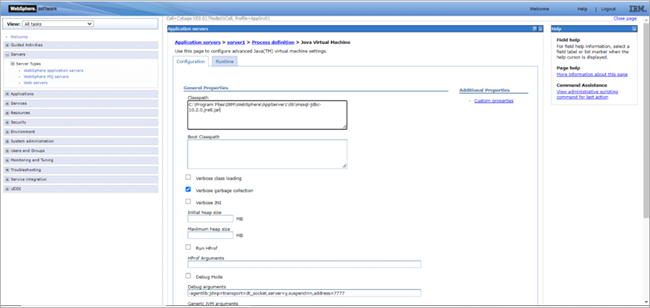
No suitable driver found for JDBC: If you find an error reading file of a different application where you have copied the driver and the property file.
Solution: Check the JVM setting in the WebSphere path: Servers > Process definition > Additional Properties.
-
You can change only the
isLoggingandLoginLevelparameters in the DelineaDriver.properties file manually. Run SetupUtility.jar to change the other parameter (for example, URL, identity); otherwise, the Proxy driver will not work as expected. -
Failed to connect to the DataSource: encountered java.lang.NullPointerException
Solution: Check whether you have provided the Delinea DataSource JNDI Name.
-
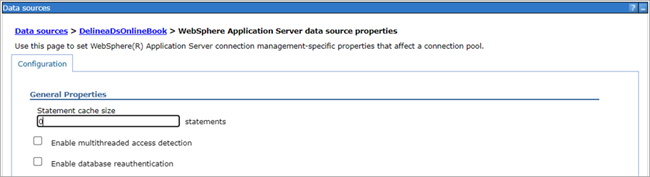
If there is an exception “Error closing a JDBC child wrapper, com.ibm.ws.rsadapter.jdbc.WSJdbcPreparedStatement@9172db56com.ibm.websphere.ce.cm.ObjectClosedException: DSRA9110E: Statement is closed.”
Solution: Update the statement cache size in WebSphere Application Server by selecting Applications > JDBC > Data Source > Delinea Data Source > WebSphere Application server data source properties > statement cache size.
-
How to collect logs for JDBC Proxy Driver and Secret Server or Delinea Platform Integration?
Solution:
-
Run the SetUpUtility. For more information, see Run the SetUpUtility.
-
The SetupUtility encrypts the Secret Server or the Delinea Platformcredentials and creates a
DelineaDriver.propertiesfile in the current folder and copies theDelinea-Jdbc-Proxy.jarandDelineaDriver.propertiesfiles into the web application’s lib folder. -
Verify if DelineaDriver.properties is copied into the web application’s lib folder.
-
Verify that the
logLevelparameter is set to level 3 because the above 3 log types will get printed with an additional debug log.
-


