Delinea Credential Cache Supported Endpoints
Delinea Credentials Cache provides a RESTful API with multiple endpoints for authentication, credential retrieval, and cache management. The application comes with several endpoints. Once you install Delinea Credentials Cache, you can use Swagger to validate these endpoints. Swagger provides an interactive interface where you can test each endpoint, view request and response formats, and ensure the API is functioning correctly.
Delinea Credentials Cache supports the following endpoints:
- Token Generation – Authenticates users and returns an access token
- API Credential by ID – Retrieves and caches secrets from Delinea Secret Server
- Refresh Secret on Change Event – Updates the cache when secrets change through Event Pipeline notifications
Accessing Swagger UI
Verify that the Delinea Credential Cache package is installed on either Windows or Linux , because Swagger is automatically published as part of the package.
Swagger UI is an interactive web-based tool that provides comprehensive documentation and testing capabilities for the Delinea Credentials Cache API. Through Swagger UI, you can explore all available endpoints, understand their parameters and response formats, and execute test requests directly from your browser without writing any code. This makes it an invaluable tool for validating your Credentials Cache installation, troubleshooting API issues, and familiarizing yourself with the API before integrating it into your applications.
In order to access the Swagger file, open the following URL in a browser:
https://{ServerName}/{installedFolderDirectory}/swagger/index.html
Replace {ServerName} with your server name and {installedFolderDirectory} with the name of your Credentials Cache installation folder (for example, DelineaCredCache).
Confirm:
- The Swagger page loads
- API endpoints are visible
- An Authorize button exists
Swagger Authorization
Before using the protected endpoints, you must authorize using a Bearer token.
Steps:
-
Open Swagger UI.
-
Click Authorize.
-
Enter:
Bearer <access_token> -
Click Authorize, then click Close.
Supported Endpoints
1. Token Generation
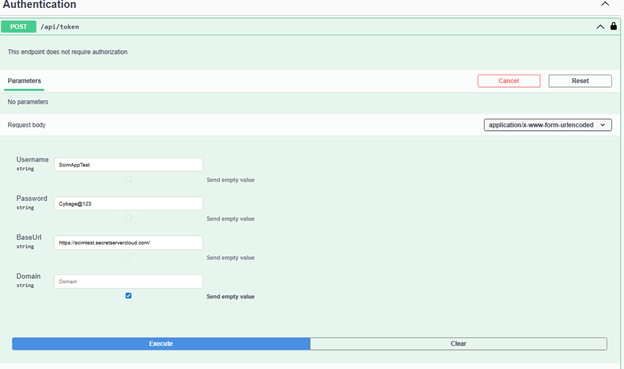
The Token Generation endpoint is the entry point for all API interactions with Delinea Credentials Cache. Before you can retrieve credentials or trigger cache updates, you must first obtain an access token by authenticating with your Delinea credentials. This endpoint accepts your username, password, base URL, and optional domain information, then returns a Bearer token that you use to authorize subsequent API calls. The token validates your identity and ensures secure access to protected endpoints.
This endpoint authenticates the user with Delinea and returns an access token for further API calls.
Endpoint
POST /api/token
Authorization
Not required
Request Content-Type
application/x-www-form-urlencoded
Request Parameters
| Name | Type | Required | Description |
|---|---|---|---|
| Username | string | Yes | Delinea username |
| Password | string | Yes | Delinea user password |
| BaseUrl | string | Yes | Base URL of Delinea Secret Server |
| Domain | string | No | Domain name (if applicable) |
Expected Result
-
200 OK
-
Token returned in the response
Example (PowerShell)
$body = @{
                Username = "<username>"
                Password = "<password>"
                BaseUrl  = "https://<secret-server-host>/SecretServer"
                Domain   = "<domain>"   # optional
                }

                $response = Invoke-RestMethod `
                -Method Post `
                -Uri "https://localhost/DelineaCredCache/api/token" `
                -ContentType "application/x-www-form-urlencoded" `
                -Body $body

            $response
2. API Credential by ID
The API Credential by ID endpoint is the core functionality of Delinea Credentials Cache. When your application needs to retrieve a secret, it calls this endpoint with the specific Secret ID from Delinea Secret Server. The endpoint fetches the secret from Secret Server and stores it in the local cache for the duration you configure in appsettings.json. Subsequent requests for the same secret within the cache expiration period retrieve the credential directly from the cache, reducing API calls to Secret Server and improving application performance. This caching mechanism ensures fast credential access while maintaining security through configurable expiration times.
Applications retrieve credentials from the cache using the GET /api/credential/{id} endpoint. This endpoint retrieves the secret from Delinea Secret Server and caches it in the Delinea Credential Cache for a duration you configure in appsettings.json. The CredentialCacheExpirationMinutes parameter determines how long a cached secret remains valid before it expires and the system automatically removes it from the cache (default value is 10 minutes).
Endpoint
GET /api/credential/{id}
Authorization
Required (Bearer token)
Path Parameters
| Name | Type | Required | Description |
|---|---|---|---|
| id | int | Yes | Delinea Secret ID |
Query Parameters
| Name | Type | Required | Description |
|---|---|---|---|
| autoComment | string | No | Optional audit or log comment |
Sample Request
GET /api/credential/1234?autoComment=Fetched+by+App
            Authorization: Bearer <access_token>
Expected Result
- 200 OK – Credential retrieved successfully
3. Refresh Secret on Change Event
The Refresh Secret on Change Event endpoint ensures that your cached credentials stay synchronized with Secret Server when passwords or other secret values change. Rather than waiting for the cache to expire naturally, this endpoint allows immediate cache updates through Event Pipeline integration. When you configure an Event Pipeline in Delinea Secret Server to monitor secret changes, the pipeline automatically triggers a PowerShell script that calls this endpoint with the changed Secret ID. The endpoint then retrieves the updated secret from Secret Server and refreshes the local cache immediately, ensuring your applications always have access to the most current credentials without experiencing authentication failures due to stale cached values.
When a secret changes in Secret Server or Delinea Platform, the Event Pipeline triggers a PowerShell script that calls the POST /api/secretchanged endpoint, which retrieves the updated secret and refreshes the local cache. You can control which secrets the system caches by adding Secret filters in the Event Pipeline configuration to trigger the pipeline for specific secrets.
Endpoint
POST /api/secretchanged
Authorization
Required (Bearer token)
Request Content-Type
application/json
Request Body
{
                "secretId": "1234"
            }
Request Parameters
| Name | Type | Required | Description |
|---|---|---|---|
| secretId | string | Yes | Delinea Secret ID that changed |
Sample Request
POST /api/secretchanged
                Authorization: Bearer <access_token>
                Content-Type: application/json

                {
                "secretId": "1234"
            }
Expected Result
- 202 Accepted
appsettings.json and verify that the latest log entries show the secret retrieval and cache update for the specified Secret ID.
When the system calls the endpoint, Delinea Credentials Cache retrieves the updated secret from Secret Server and updates its local cache.


