Windows Setup
This topic describes how to set up Delinea Credentials Cache in Windows. To set up Delinea Credentials Cache in Windows, install the Delinea Credentials Cache package.
Installing the Delinea Credentials Cache Package on Windows
You must install the Delinea Credentials Cache package on your Windows. For Windows, you must then move the contents of the package to a specific directory on your Web server.
Installing Delinea Credentials Cache on Windows
Using Delinea Credentials Cache in Windows requires adding websites with IIS. IIS is included with the Windows operating system. The following procedure includes steps for enabling IIS in Windows.
To install the Delinea Credentials Cache package:
-
Download the package (a zip archive).
-
Extract the contents of the archive.
Open the folder properties and on the Security tab, grant the IIS_IUSRS group the Full control permission for the
/DelineaCredentialCache_Windowsfolder, as shown.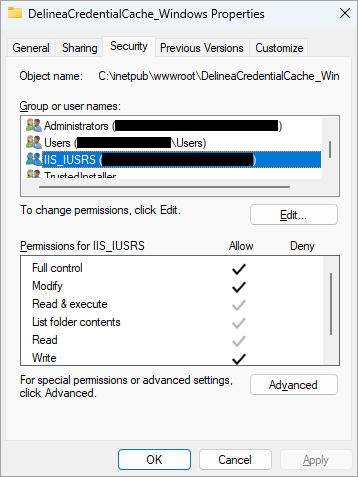
-
Move the extracted
DelineaCredentialCache_Windowsfolder to C:\inetpub\wwwroot. -
In the search box on the taskbar in Windows, enter Windows features.
-
In the search results, select Turn Windows features on and off.
-
In the Windows Features dialog, locate Internet Information Service and select the checkbox next to it.
-
Select OK.
-
Wait until Windows applies the requested changes.
The following steps describe how to enable IIS in Windows.
Installing Delinea Credentials Cache on Linux
This topic covers how to install and configure Delinea Credentials Cache on a Linux host using Apache HTTP Server as a reverse proxy.
These instructions apply to Ubuntu Linux and Red Hat Enterprise Linux (RHEL). Where steps differ between distributions, both variants are shown.
Prerequisites
Before you begin, ensure the following requirements are met:
-
Root or sudo privileges on the Linux host.
-
Network access to the Delinea marketplace download server and to your Secret Server or Delinea Platform instance.
-
Apache HTTP Server (
apache2on Ubuntu,httpdon RHEL) available for installation.
Step 1: Download and Extract the Package
To download and extract the Delinea Credentials Cache package for Linux:
-
Download the Linux package (a zip archive).
-
Create a directory for Delinea Credentials Cache and extract the archive into it:
mkdir credcacheunzip DelineaCredentialCache_Linux.zip -d ~/credcache
Step 2: Install the .NET Runtime
Delinea Credentials Cache requires the ASP.NET Core runtime. Follow the steps for your Linux distribution.
Ubuntu Linux
Open a terminal with root privileges and run the following commands in order:
-
Get the Ubuntu version:
declare repo_version=$(if command -v lsb_release &> /dev/null; then lsb_release -r -s; else grep -oP '(?<=^VERSION_ID=).+' /etc/os-release | tr -d '"'; fi) -
Download the Microsoft signing key and repository:
wget https://packages.microsoft.com/config/ubuntu/$repo_version/packages-microsoft-prod.deb -O packages-microsoft-prod.deb -
Install the Microsoft signing key and repository:
sudo dpkg -i packages-microsoft-prod.deb -
Clean up the downloaded file:
rm packages-microsoft-prod.deb -
Install the ASP.NET Core runtime:
sudo apt install aspnetcore-runtime-8.0
Red Hat Enterprise Linux (RHEL)
Open a terminal with root privileges and run the following commands in order:
-
Import the Microsoft signing key:
sudo rpm --import https://packages.microsoft.com/keys/microsoft.asc -
Add the Microsoft .NET repository:
sudo tee /etc/yum.repos.d/dotnet-sdk.repo << EOF[microsoft-dotnet]name=Microsoft dotnetbaseurl=https://packages.microsoft.com/rhel/8/prod/enabled=1gpgcheck=1gpgkey=https://packages.microsoft.com/keys/microsoft.ascEOFIf you are using RHEL 7, replace
rhel/8withrhel/7in thebaseurlline. -
Install the ASP.NET Core runtime:
sudo yum install aspnetcore-runtime-8.0
Step 3: Create a systemd Service
Create a systemd service so that Delinea Credentials Cache runs in the background and restarts automatically if it stops.
-
Create the service configuration file:
sudo nano /etc/systemd/system/credcache.service -
Insert the following content. Replace the
WorkingDirectoryandExecStartpaths with the actual location of your extracted package, and replaceyourusernamewith the user account that will run the service.[Unit]Description=Delinea Credential CacheAfter=network.target[Service]WorkingDirectory=/home/ubuntu/credcacheExecStart=/usr/bin/dotnet /home/ubuntu/credcache/DelineaCredentialCache.dllRestart=alwaysRestartSec=10SyslogIdentifier=delineacredcacheUser=yourusernameEnvironment=ASPNETCORE_ENVIRONMENT=Production[Install]WantedBy=multi-user.target -
Press Ctrl + O to save, press Enter, then press Ctrl + X to exit.
-
Reload the systemd daemon to register the new service:
sudo systemctl daemon-reload -
Start the service:
sudo systemctl start credcache.service -
Enable the service to start automatically on boot:
sudo systemctl enable credcache.service -
Verify that the service is running:
sudo systemctl status credcache.service
To stop the service when required, run sudo systemctl stop credcache.service.
Step 4: Set Up Apache HTTP Server as a Reverse Proxy
Delinea Credentials Cache listens on a local port. Apache HTTP Server acts as a reverse proxy to expose the service over HTTP or HTTPS. Follow the steps for your Linux distribution and protocol.
Ubuntu Linux — HTTP
-
Install Apache HTTP Server:
sudo apt install apache2 -
Create the configuration file:
sudo nano /etc/apache2/sites-available/credcache.conf -
Insert the following content. Replace
your-domain.comwith your server name.<VirtualHost *:80>ServerName your-domain.comProxyPass / http://localhost:8080/ProxyPassReverse / http://localhost:8080/</VirtualHost> -
Press Ctrl + O to save, press Enter, then press Ctrl + X to exit.
-
Enable the proxy modules:
sudo a2enmod proxysudo a2enmod proxy_http -
Enable the site:
sudo a2ensite credcache -
Restart Apache HTTP Server:
sudo systemctl restart apache2
Ubuntu Linux — HTTPS
-
Install Apache HTTP Server and OpenSSL:
sudo apt install apache2sudo apt-get update && sudo apt-get install openssl -
Create an OpenSSL configuration file:
sudo nano /etc/ssl/openssl2.cnf -
Insert the following content. Replace the
commonName,DNS.1, andIP.1values with the fully qualified domain name and IP address of your Linux computer.[req]default_bits = 2048default_keyfile = localhost.keydistinguished_name = req_distinguished_namereq_extensions = req_extx509_extensions = v3_ca[req_distinguished_name]commonName = your-host.your-domain.comcommonName_default = your-host.your-domain.comcommonName_max = 64[req_ext]subjectAltName = @alt_names[v3_ca]subjectAltName = @alt_names[alt_names]DNS.1 = your-host.your-domain.comDNS.2 = localhostIP.1 = 0.0.0.0 -
Press Ctrl + O to save, press Enter, then press Ctrl + X to exit.
-
Generate a self-signed certificate:
sudo openssl req -x509 -nodes -days 365 -newkey rsa:2048 -keyout /etc/ssl/private/selfsigned.key -out /etc/ssl/certs/selfsigned.crt -config /etc/ssl/openssl2.cnf -
Generate the certificate in PFX format:
sudo openssl pkcs12 -export -out /etc/ssl/certs/selfsigned.pfx -inkey /etc/ssl/private/selfsigned.key -in /etc/ssl/certs/selfsigned.crt -
Create the Apache HTTP Server configuration file:
sudo nano /etc/apache2/sites-available/credcache.conf -
Insert the following content. Replace the server name and file paths if required.
<VirtualHost *:443>ServerName your-host.your-domain.comSSLEngine onSSLCertificateFile /etc/ssl/certs/selfsigned.crtSSLCertificateKeyFile /etc/ssl/private/selfsigned.keySSLProxyEngine onProxyPass / http://localhost:5000/ProxyPassReverse / http://localhost:5000/</VirtualHost> -
Press Ctrl + O to save, press Enter, then press Ctrl + X to exit.
-
Enable the required modules and the site:
sudo a2enmod proxy proxy_http sslsudo a2ensite credcache -
Restart Apache HTTP Server:
sudo systemctl restart apache2
Red Hat Enterprise Linux — HTTP
-
Install the required packages:
sudo yum install httpd mod_proxy mod_proxy_http -
Create the configuration file:
sudo nano /etc/httpd/conf.d/credcache.conf -
Insert the following content. Replace
your-domain.comwith your server name.<VirtualHost *:80>ServerName your-domain.comProxyPass / http://localhost:8080/ProxyPassReverse / http://localhost:8080/</VirtualHost> -
Press Ctrl + O to save, press Enter, then press Ctrl + X to exit.
-
Start the httpd service:
sudo systemctl start httpd
Red Hat Enterprise Linux — HTTPS
-
Install OpenSSL:
sudo yum install openssl -
Create an OpenSSL configuration file:
sudo nano /etc/ssl/openssl2.cnf -
Insert the configuration content as shown in the Ubuntu HTTPS section above, replacing
commonName,DNS.1, andIP.1with your server's values. -
Press Ctrl + O to save, press Enter, then press Ctrl + X to exit.
-
Generate a self-signed certificate:
sudo openssl req -x509 -nodes -days 365 -newkey rsa:2048 -keyout /etc/ssl/private/selfsigned.key -out /etc/ssl/certs/selfsigned.crt -config /etc/ssl/openssl2.cnf -
Generate the certificate in PFX format:
sudo openssl pkcs12 -export -out /etc/ssl/certs/selfsigned.pfx -inkey /etc/ssl/private/selfsigned.key -in /etc/ssl/certs/selfsigned.crt -
Create the HTTPS configuration file:
sudo nano /etc/httpd/conf.d/ssl.conf -
Insert the following content. Replace the server name and file paths if required.
<VirtualHost *:443>ServerName your-host.your-domain.comSSLEngine onSSLCertificateFile /etc/ssl/certs/selfsigned.crtSSLCertificateKeyFile /etc/ssl/private/selfsigned.keySSLProxyEngine onProxyPass / http://localhost:5000/ProxyPassReverse / http://localhost:5000/</VirtualHost> -
Press Ctrl + O to save, press Enter, then press Ctrl + X to exit.
-
Enable the proxy modules and start httpd:
sudo yum install mod_proxy mod_proxy_http mod_proxy_sslsudo systemctl start httpd
Step 5: Verify the Installation
After completing the setup, confirm that Delinea Credentials Cache is running correctly.
-
Check the service status:
sudo systemctl status credcache.service -
Open the Swagger UI in a browser to confirm the API is accessible. Replace
httpwithhttpsif you configured HTTPS:http://your-server/credcache/swagger/index.html -
If the page does not load, check the Apache HTTP Server error log:
Ubuntu:
sudo tail -f /var/log/apache2/error.logRHEL:
sudo tail -f /var/log/httpd/error_log
For detailed validation steps including Event Pipeline verification, see Verification.


