Configuring HSM in Secret Server
PKCS#11
-
Open the Secret Server web application and log in with administrator access.
-
Navigate to Settings -> Configuration -> General -> HSM.
-
In HSM Configuration page, enable HSM if you haven't already.
-
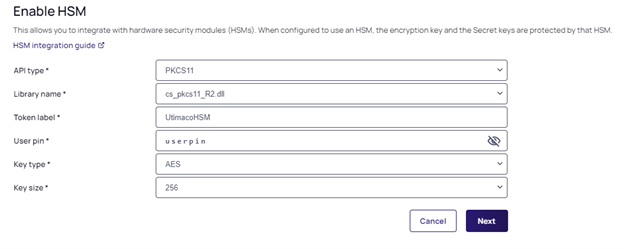
Select API Type: PKCS#11 and provide the path to cs_pkcs11_R3.dll.
-
Enter Token Label and User Pin (from the PKCS#11 setup).
Example of PKCS#11 settings in Secret Server:
CNG
-
Open the Secret Server web application and log in with administrator access.
-
Navigate to Settings -> Configuration -> General -> HSM.
-
In HSM Configuration, enable HSM if you haven't already.
-
Select the Utimaco CryptoServer Key Storage Provider option, a CNG-based service provider.
-
Choose a key size of 2048 or 4096.
-
Select Next.
-
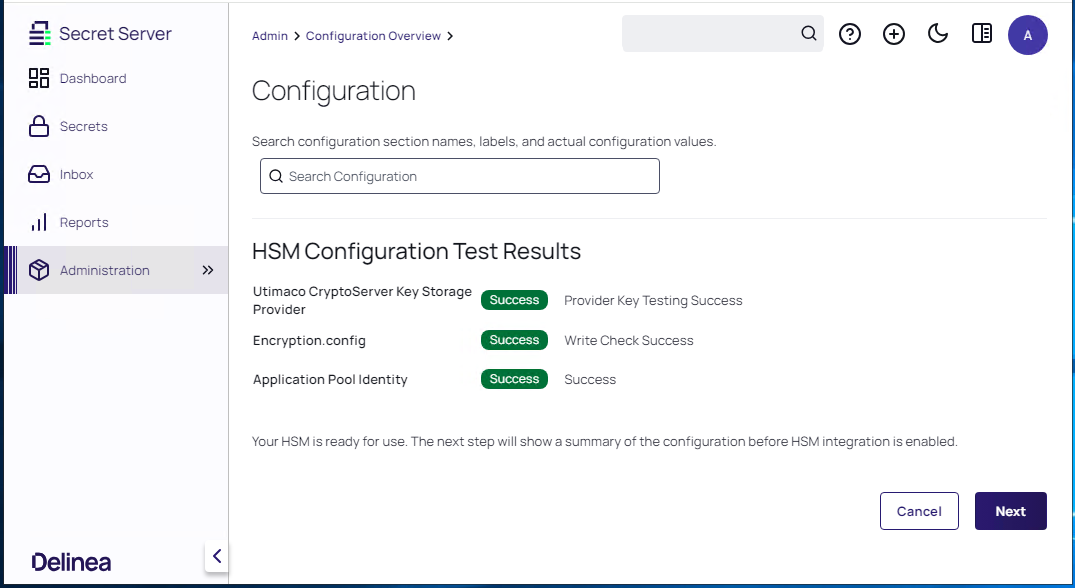
If the Secret Server is successfully connected to HSM the following message is displayed:
For more information about HSM configuration in Secret Server, click here.


