Testing the Connection with Secret Server
Get Credential can now pull a password from Secret Server and save it as a SecureString variable and can be used in another Activity. A good test to see whether the connection with Secret Server is working is when the credentials are fetched from Secret Server and entered in Notepad.
-
The Text field is where you can instruct the Notepad to display the newly saved variable.
-
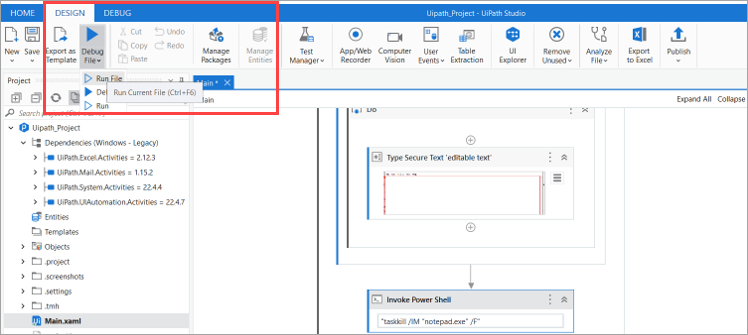
Select Run File to test the Secret Server connectivity.
-
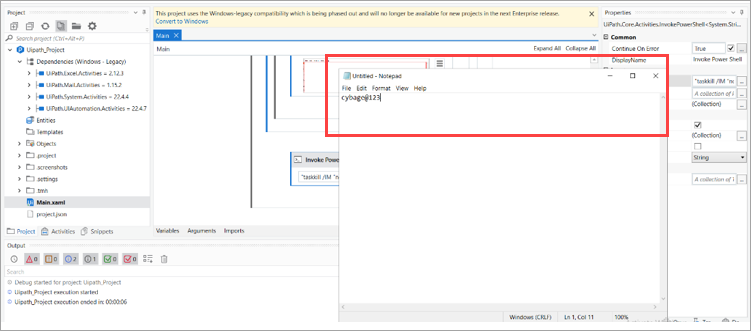
A Notepad should display with the password value from Secret Server.
Test the Get Credential Action
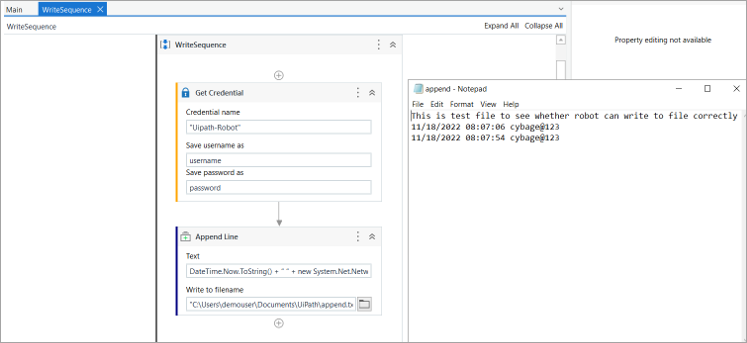
When the integration is functioning, the next test is whether the Robot can correctly carry out a Get Credential action unattended. For the second example, we will use the same Get Credential activity but pair it with the “Append Line” activity.
If this is a new Sequence, a new SecureString variable needs to be created.
-
To configure the Append Line activity, the following information is needed:
- The file you want to append a line to (for example, a Notepad file that was previously created).
- The text you want to append. A time and date stamp are helpful to make
sure that the Robot wrote to the text file at the correct time. The following text is a useful test:
DateTime.Now.ToString() + “ “ + new System.Net.NetworkCredential(string.empty, notepadPass).Password
-
Select Run File.
-
The UiPath Studio will pause for a moment and then reopen.
-
Check the text file to ensure that the change was made.