Troubleshooting
Find Delinea Privileged Access Request Logs
Delinea Privileged Access Request provides detailed logs for errors you might encounter providing access to zone roles.
Go to ServiceNow > Centrify Privileged Access Request > Admin > Logs to find the logs.
ServiceNow Auto Approved or Denial Requests
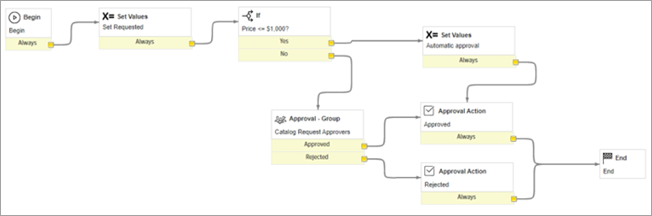
If your ServiceNow requests are being automatically approved or denied, check your ServiceNow approval flow.
When a request is received by ServiceNow, it is assigned a specific dollar amount. To streamline the approval process, you can configure ServiceNow to automatically approve or deny requests based on the dollar value. If the assigned dollar amount is below/above the set threshold for automatic approval or denial, ServiceNow will take action accordingly. To adjust these settings, review the configuration in ServiceNow.
For more information, see the following ServiceNow configuration.
Catalog items are not visible in the Service Catalog
If catalog items are not displayed in the Service Catalog:
-
Go to the filter navigator.
-
In the Search field, specify "Maintain Item".
-
Open the Catalog Item record, which is not visible.
-
Ensure the category of the Maintain Item is Application and Account Access.
-
If the category is empty, select the Application and Account Access category from the list.
-
Save the changes.
-
Go to All > Service Catalog to check the catalog items' visibility.


