Verification
-
Ensure that your policy is properly pulled through and synced with the Agent utility. This step confirms that the latest policies are applied to the system.
-
Run the application you have defined your Policy (in this case the application is putty.exe).
-
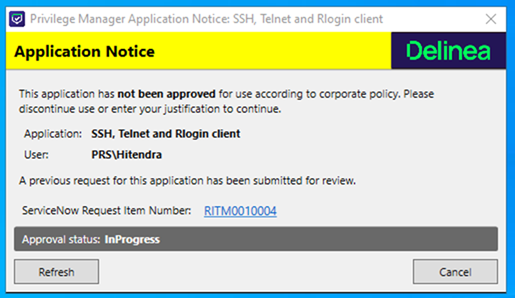
An approval window should automatically appear once the application runs and policy enforcement is triggered.
-
Provide a reason for this request and select Continue.
-
The approval modal will remain open. After a short delay, it will display the RITM (Request Item) number and the status of the request as In progress.
-
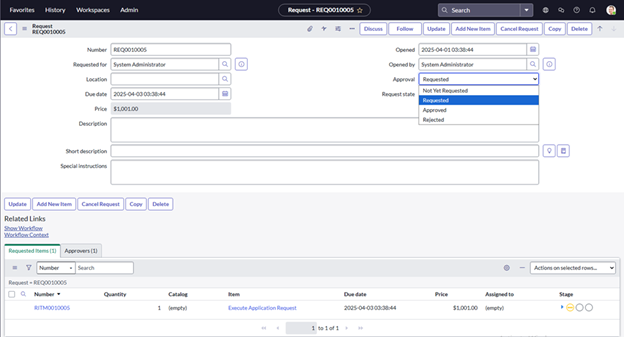
Log into your ServiceNow instance and navigate to All > Self Service > My Requests.
-
From the list of requests, select the REQ (Request) number associated with the approval request.
-
In the ServiceNow, under the Approval dropdown, choose the appropriate action: Approved or Rejected.
-
Select Update to confirm your selection.
-
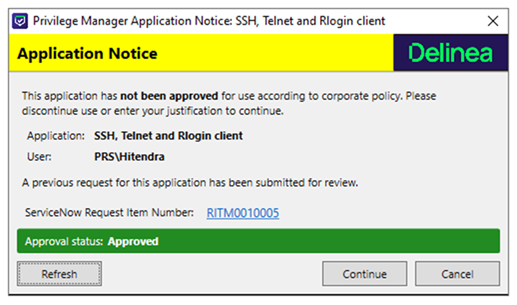
The status of the request will be updated automatically in the Agent utility. The system will reflect the new status based on the what you selected in ServiceNow.