Secret Server Configuration
Depending on the credential type that you are validating, make sure you are using the appropriate secret template as per the table below:
| ServiceNow Credential Type | Template Name | Template Type | Note |
|---|---|---|---|
| Active Directory Account |
Windows Account - version 4.6 and below Active Directory Account -starting with version 5.0 |
Built-in |
Used for domain authentication. |
| JDBC | JDBC Credential | Built-in | Used for database connections. |
| SSH | Unix Account (SSH) | Built-in | Default SSH password-based login template. |
| SSH PrivateKey | SSH Key | Built-in | May appear separately or within Unix Account. |
| Windows | Windows Account | Built-in | Available by default in most configurations. |
| JMS* | JMS Credential | Custom | For Java Messaging Service access. |
| SNMPv3* | SNMPv3 | Custom |
Requires custom template with SLUGs. |
| SNMP Community* | SNMP Credential | Custom | Must create custom template manually. |
| VMware* | VMware Credential | Custom | Credentials used to authenticate and manage VMware's virtualization software running on physical servers |
| Kubernetes Credentials * | Kubernetes Credentials | Custom | Used to authenticate and manage access to Kubernetes clusters, typically using tokens. |
| Azure Service Principal Servicenow * | Azure Service Principal Servicenow | Custom | Used to authenticate with Azure services via a Service Principal, often for integrations like ServiceNow automation. |
| AWS Credentials | Amazon IAM Key | Built-in | |
| API Key Credentials | Generic API Key | Built-in | |
| Google Cloud Credentials | Google Cloud Credentials | Custom | |
| Google API Credentials (GCP) | Google API Credentials | Custom | |
| OAuth 2.0 Credentials | OAuth 2.0 Credentials | Custom | |
| IBM Credentials | IBM Credentials | Custom |
* For Azure Service Principal Servicenow, you must create a custom template with the following fields and SLUG mappings:
| Field | Slug | Type |
|---|---|---|
| Tenant ID | tenant-id | Text |
| Client ID | client-id | Text |
| Secret key | secret-key | Password |
| Auth Method | auth-method | Text |
* For JMS and VMware, you must create a custom template with the following fields and SLUG mappings:
| Field | Slug | Type |
|---|---|---|
| Username | username | Text |
| Password | password | Password |
* For SNMP Community, you must create a custom template with the following fields and SLUG mappings:
| Field | Slug | Type |
|---|---|---|
| Username | username | Text |
| Password | password | Password |
* For Kubernetes Credentials (sn_itom_pattern_kubernetes), you must create a custom template with the following fields and SLUG mappings:
| Field | Slug | Type |
|---|---|---|
| username | username | Text |
| password | password | Password |
| bearer token | bearer-token | Text |
*For SNMP V3, you must create a custom template with the following fields and SLUG mappings:
| Field | Slug |
|---|---|
| Username | Username |
| Authentication protocol | authentication-protocol |
| Authentication Key | authentication-key |
| Privacy protocol | privacy-protocol |
| Privacy key | privacy-key |
*Google Cloud Credentials
| Field | Slug |
|---|---|
| Client Email | client-email |
| Private Key | private-key |
*Google API Credentials (GCP)
| Field | Slug |
|---|---|
| Secret Key | secret-key |
*OAuth 2.0 Credentials
| Field | Slug |
|---|---|
| Oauth Entity Profile | oauth-entity-profile |
*IBM Credentials
| Field | Slug |
|---|---|
| Softlayer User | softlayer-user |
| Softlayer Key | softlayer-key |
| Bluemix Key | bluemix-key |
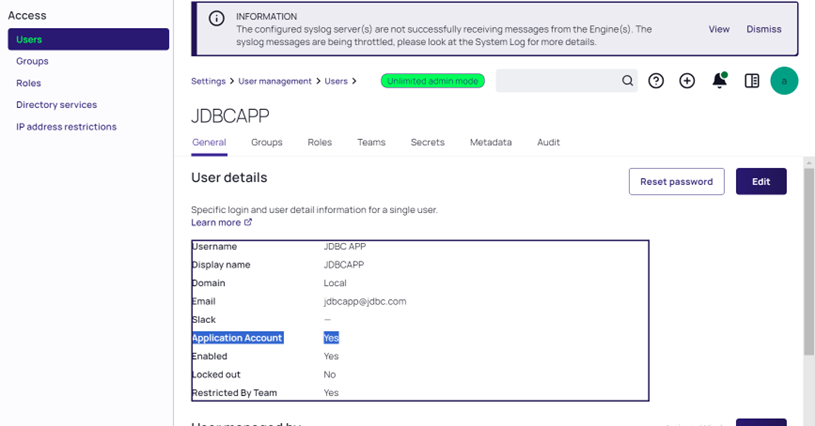
Creating an Application Account in Secret Server
-
Create a Application Account user in Secret Server.
-
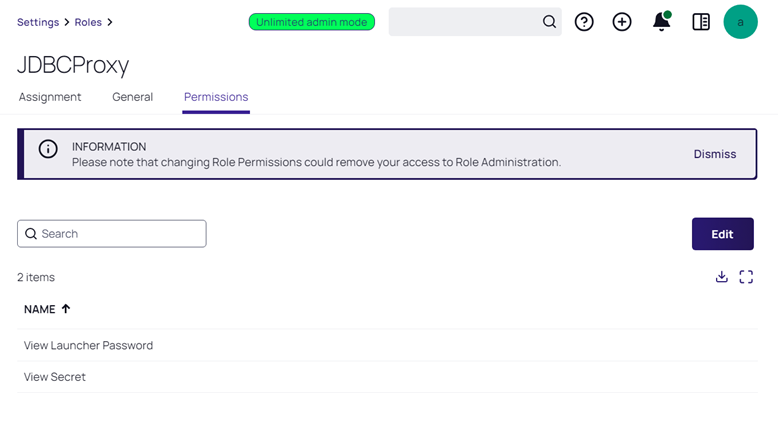
Create a Role in Secret Server with View Secret and View Launcher Password permissions.
Creating a Secret in Secret Server
-
Create a secret in the Delinea Secret Server. Make note of the SecretID which is shown in the URL as this is needed when setting up the credential in ServiceNow.. The following is an example of a Windows Credential.
-
Add the Service / Application Account user in the Sharing section of the secret.


