Troubleshooting
To collect logs for ServiceNow Mid Server instances, follow these steps:
-
Check the Logs file of MID Server in case of failures. Logs are stored at
<Mid Server installation path> / agent/log/. -
Select the wrapper.log file to be shared.
Ensure the log level is configured to 4 to capture detailed logs, especially when validating credentials.
-
Review the wrapper.log file for any debug messages or errors related to the issue.
Certificate Errors
If you see failures in validating credentials, review the MID Server’s agent log. If you find errors referring to PKIX path failures, the SSL certificate for Delinea Platform needs to be imported into the Java Keystore for the MID Server agent, see the Adding SSL Certificate to MidServer for more details.
PKIX Errors Example Log:

If the Credential Resolver is not working, use the following solutions.
-
External Credential storage ServiceNow instance plugin: After adding External Credential storage plugins to ServiceNow instance, sometimes user can’t see the checkbox for External Credential Store plugin on credentials page (ServiceNow instance > Discovery > Credentials). To solve this problem, wait and refresh at regular intervals.
-
Authentication fails: Check the following if authentication fails.
- Correct the credentials of a Secret in the Delinea Platform.
- The user in configuration file should have a View permission.
- Check the permissions of the Delinea Platform user that was used in the configuration file. The user should have an Application Account with at least View Launcher Password permission.
-
Check the Delinea Platform
platform_url,platform_auth_strparameters in theconfig.xmlfile. -
Verify the credentials you entered when running the
DelineaMidServerSetupUtilityjar file.
-
Timeout Exception: If network issues occur, a user might experience a timeout exception. If this happens, check the network and restart the MID Server and validate it again.
-
Invalid target specified: During the test if the user receives an invalid target specified message, do the following:
- Check the hostname or the IP address of a Secret in SecretServer or Delinea Platform.
- Use the IP address entered while testing the credential. Make sure it is correct and the machine credential is in the Secret Server template.
-
Version Mismatch: If the user has a version mismatch, upgrade MID Server because the ServiceNow instance was upgraded to a higher version.
-
Unable to decrypt the credential: The encrypted string copied from the command prompt to config.xml failed to decrypt.
-
Run the
DelineaMidServerSetupUtilityjar file on the same server as the Mid Server. -
Ensure tags are copied correctly.
-
-
Unable to run the DelineaMidServerSetupUtility JAR file:
Use "Java -version" command.to ensure that Java 11 or higher is installed on your machine.
-
Debugging Tips:
- If the plugin is not working, check the MID Server Logs file. Check to see that all configurations of config.xml file are correct.
- Check the user permission in the Delinea Platform for the user which is configured in MID Server config.xml file (MID Server path/agent/config.xml).
- Check all the Secret details in the Secret, (for example, passwords and machine details).
"Invalid IP Specified" error after Xanadu update
Since the Xanadu release, if you do not select Delinea as the Credential Storage Vault in your MID Server integration configuration, you may encounter the following problems:
-
Invalid IP Specified error messages.
-
MID Server agent logs show
vaultProvider = null.
Starting with Xanadu, selecting None instead of Delinea is not supported when using Delinea Platformfor credentials.
Resolution
Always select Delinea as the Credential Storage Vault for all MID Server integrations involving Delinea Platform.
Known Issues
Active Directory Secret Creation Template Issue (version 4.6 and below)
When creating a secret for an Active Directory account, always select the Windows Account template. Ensure that you enter the username in the correct format: domain\username.
This format works for both ServiceNow and Secret Server.
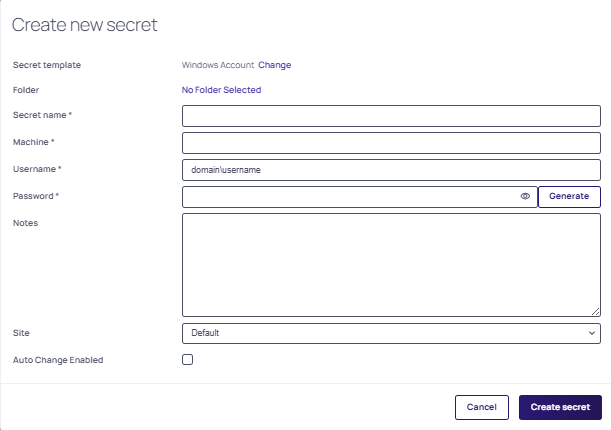
*Delinea includes both default templates (e.g., Windows, MySQL, SSH) and custom templates for specialized use cases). To learn more about secret templates, go here Built-in Secret Templates.
Decryption / Parameter Issue (Config Mismatch)
A configuration mismatch occurs when the credential resolver version and the Setup Utility version are out of sync, resulting in incorrect parameter names in config.xml.
Symptoms
One or more of the following messages appear in wrapper.log:
-
Failed to decrypt the ss_auth_str or platform_auth_str string -
Unable to parse the param from config.xml file -
Unable to read data from config.xml file of MID Server -
Please check the Secret Server url and credential in config.xml file
Root Cause
The credential resolver is version 5.0 or above, but an older Setup Utility JAR was used to generate config.xml. Parameter names changed in version 5.0:
-
Added parameters:
ss_url,platform_url,platform_auth_str,ss_auth_str -
Removed parameters:
ss_or_platform_url,ss_or_platform_auth_str
Solution
-
Navigate to
MID_Server\agent\extliband verify that the credential resolver JAR files are version 5.0 or above. -
Run the correct Setup Utility for the installed resolver version:
-
DelineaMidServerCLIUtility-5.2.0.jar, or -
DelineaMidServerUIUtility-5.2.0.jar
-
-
Regenerate the parameters in
config.xml. -
Restart the MID Server service.
-
Test the connection again in ServiceNow.
PKIX Path Building Failed (Certificate Issue)
This issue occurs when the MID Server does not trust the SSL certificate presented by the Delinea Secret Server or Platform.
Background: How SSL Trust Works
The MID Server (and the credential resolver JAR) relies on the Java truststore (cacerts) to validate the HTTPS certificate presented by the Delinea Secret Server. During initial setup, there is typically no need to manually import certificates, as long as the certificate chain presented by the server is trusted by the default Java truststore.
If the Secret Server is updated to use a certificate chain that includes a new intermediate certificate not present in the MID Server's Java truststore, SSL validation fails.
There are no automatic updates to the MID Server truststore. Any new or missing intermediate certificates must be added manually.
Certificate Chain Rotation
If the integration was working previously and starts failing, the cause is typically a certificate expiration or a change in the certificate chain. For example, Sectigo intermediate certificates rotated in April 2025 may cause trust failures if the new intermediate is not present in the MID Server's truststore.
If everything was working previously, it typically indicates that:
-
The truststore already contained the required root and intermediate certificates, or
-
The server was presenting a certificate chain compatible with the existing truststore.
In such cases, the new intermediate certificate must be imported into the MID Server's Java truststore to reestablish trust.
Diagnostic Checklist
Before proceeding with the solution steps, administrators should confirm the following:
-
Whether the SSL certificate or certificate chain was recently updated on the Secret Server.
-
The exact error message observed (for example, PKIX or certificate path errors) to validate that this is a trust-related issue.
Error
The following message appears in wrapper.log:
PKIX path building failed: SunCertPathBuilderException: unable to find valid certification path
Root Cause
The MID Server's Java truststore does not contain the root or intermediate certificate required to trust the SSL certificate from the Delinea Secret Server or Platform.
Solution
-
Export the SSL certificate from a browser:
-
Navigate to the Secret Server URL in a browser.
-
Click the site icon in the address bar.
-
Select Certificate > Details > Export and save the certificate in DER-encoded binary (
.cer) format.
-
-
Open a terminal and navigate to the Java bin directory:
MID_Server\agent\jre\bin -
Run the following command, replacing the alias name and file path with the appropriate values for the environment:
keytool -import -alias certificateAliasName -file "path\to\example.cer" -keystore "MID_Server\agent\jre\lib\security\cacerts"-
-alias— A meaningful name for the certificate alias. -
-file— The path of the exported.cercertificate.
-
-
When prompted, enter the keystore password. The default password is
changeit. -
When prompted to trust the certificate, select Yes. The certificate is imported into the truststore.
-
(Optional) Verify the import by listing all certificates in the truststore:
keytool -list -keystore "MID_Server\agent\jre\lib\security\cacerts" -
Restart the MID Server service.
Authentication Failed During Test Connection
If a test connection fails with an authentication error, use the following steps to isolate the cause.
Validate the Credential Without the Resolver
-
Test the same credential directly in ServiceNow without the Delinea Credential Resolver.
-
If the test fails, the issue is with the credential itself, not the resolver. Verify the credential is correct before proceeding.
-
If the test succeeds, continue with the steps below.
Verify Secret Field Mapping
Confirm that the field values in the ServiceNow credential record match the corresponding fields in the Delinea secret exactly. Any mismatch between field names or values can cause authentication failures.
Check the Template Type
Custom secret templates can cause issues if the slug name does not match the resolver's field mapping file (ss-credential-resolver-field-mappings.json). Where possible, use a built-in template such as AD Account to avoid mapping issues.
Check Token Expiration and Grant File Contents
-
Check
wrapper.logfor token-related errors. The token may be expired and must be regenerated manually. -
If you are running v5.2.0 or later, Grant File Mode supports automatic token refresh. Verify that the
oauth2_grant.jsonfile contains:access_token,refresh_token, andexpires_in. If the token expired before the refresh window, it cannot be refreshed automatically. For more information, see Check Grant File Auto-Refresh below.
Check Grant File Auto-Refresh
The field expires_in controls the token lifetime, which is 1 hour by default. The token refreshes automatically within the last 3 minutes before expiration, but only if it is still valid.
Symptom: The wrapper.log shows repeated Platform token expired. Cannot refresh. Please regenerate token manually messages even after manually regenerating the grant file.
Complete the following steps in order to confirm and fix the issue:
-
Open
oauth2_grant.json. Confirm it contains all three fields:access_token,refresh_token, andexpires_in. Ifrefresh_tokenis missing, the file was generated by a pre-5.2.0 utility. Regenerate it manually usingDelineaMidServerUIUtility-5.2.0.jarorDelineaMidServerCLIUtility-5.2.0.jar. -
In
<MID Server>\agent\extlib, confirmDelineaCredentialResolver-5.2.0.jaris present and no older sibling JAR exists alongside it. -
Confirm that Credential Validation or Discovery is initiated within the 3-minute refresh window before the token expires. If discovery jobs are spaced more than an hour apart, refresh cannot fire in time. To fix it, increase Platform token lifetime, or shorten the discovery interval.
Verify Permissions
Confirm that the application or service account used by the resolver:
-
Has access to the target secret.
-
Has the required View and Retrieve permissions on the secret.
Check Logs and Configuration
Review the following files for additional error details:
-
config.xml -
wrapper.log
Check Network Connectivity
Confirm that the MID Server can reach the target machine. Ping the target to verify basic network connectivity.


