Standard SCIM 2.0 Resource Endpoints
The SCIM Connector for Secret Server is an installable IIS web application that
exposes SCIM 2.0 endpoints and translates them to Secret Server APIs. It works with
Secret Server On-Premises and Secret Server Cloud. All paths use the /v2/
prefix and require an Authorization: Bearer token generated from the
SCIM Connector Endpoint configuration.
| Endpoint | Maps to (Secret Server) | Notes |
|---|---|---|
/v2/Users
|
Users | Create, read, update, disable. DELETE disables the user — Secret Server retains users for audit. |
/v2/Groups
|
Groups | Create, read, update, delete, plus membership management. |
/v2/Containers
|
Folders | Folder hierarchy represented as SCIM containers. |
/v2/PrivilegedData
|
Secrets | Read secrets (GET) only. Create and update are handled by the custom endpoints. To retrieve unencrypted individual fields, see GetFields, which supports six lookup forms (by ID, by slug, with filters). For secrets that require a comment on view, see Retrieving Secrets That Require a Comment. |
/v2/ContainerPermissions
|
Folder permissions | Assign users or groups to folders with defined rights. |
/v2/Bulk
|
— | Bulk operations. Limits: max 1,000 operations; max payload ~1 MB (1,048,576 bytes). |
The connector also serves the standard SCIM 2.0
discovery endpoints — /v2/ServiceProviderConfig, /v2/ResourceTypes,
and /v2/Schemas — for clients that query connector capabilities and schema
definitions at runtime.
Read operations for users, groups, folders, and secrets are powered behind the scenes by SQL reports in Secret Server (SCIM All Users, SCIM All Groups, SCIM All Folders, SCIM All Secrets, and related permission/role reports) — relevant when troubleshooting incomplete endpoint results. See Data Acquisition.
For endpoints Delinea added beyond the SCIM standard, see Custom APIs.
Filtering Attributes on GET Requests
By default, a GET request returns the full record for each resource. To reduce the size of a response, add one of the following parameters to the request. Both work on a request for a single resource and on a request for a collection.
| Parameter | Returns | Example |
|---|---|---|
attributes
|
Only the attributes you list. Name a sub-attribute to return one part of a complex attribute. |
|
excludedAttributes
|
The full record without the attributes you list. Useful for large groups when only the group details are needed. |
/v2/Groups/{id}?excludedAttributes=members
|
When you use these parameters:
- Separate multiple attributes with commas.
- Attribute names are not case-sensitive.
displayNameanddisplaynameare treated the same. -
Fully qualified schema names (URNs) are also accepted, as some identity providers send attribute names in that form.
- The
id,schemas, andmetaattributes are always returned, whether or not you list them. - An attribute that does not exist returns HTTP 400.
Both parameters are supported on the Users, Groups, Roles, PrivilegedData,
Containers, ContainerPermissions, and PrivilegedDataPermissions resources.
The following example shows a complete request and response. The {id}
shown in the table above is the full SCIM resource identifier:
GET /v2/Groups/urn:ietf:params:scim:schemas:core:2.0:Group:8?attributes=displayName
200 { "id": "...Group:8", "schemas": [...], "displayName": "SCIM-QA-Group-01", "meta": {...} }
Retrieving Secrets That Require a Comment
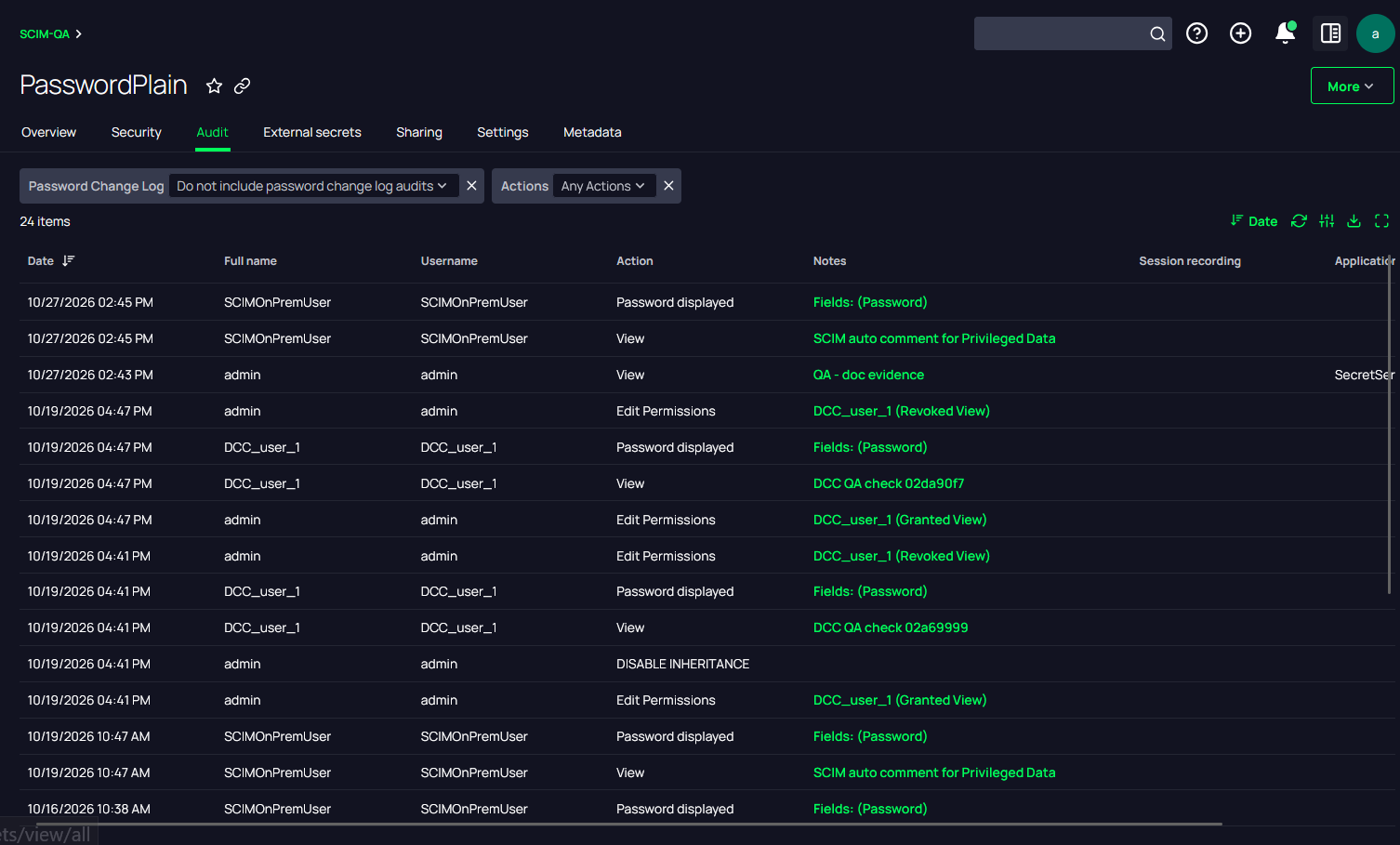
A secret in Secret Server can be set to require a comment each time someone views it.
When a request returns that requirement, the SCIM Connector retries the request with
the comment SCIM auto comment for Privileged Data attached, and the
secret is returned. Nobody is prompted, and there is nothing to configure in the SCIM
Connector. For the setting itself, see
Requiring a Comment to View a Secret.
This applies only to GET /v2/PrivilegedData/{id}, the request for an
individual secret.
Secret Server records the access in the secret's audit log as a view by the account the SCIM Connector endpoint uses, carrying that comment. The following image shows the audit log of a secret, with a comment supplied by the SCIM Connector alongside a comment typed by an administrator.
Before SCIM Connector 4.8.0, a request for a secret that required a comment failed.


