Configuring Red Hat OpenShift / ESO
For detailed information about configuring Red Hat OpenShift / ESO, see the External Secrets Operator for Red Hat OpenShift documentation.
To configure Red Hat OpenShift / ESO for the integration with Secret Server, complete the following steps:
Step 1: Creating an ExternalSecretsConfig Resource
The Red Hat version of ESO requires an ExternalSecretsConfig resource to deploy the actual controller pods. Without this configuration, the operator will be installed, but no controllers will be run, and secret synchronization will not function.
Creating an ExternalSecretsConfig resource does the following:
-
Creates the
external-secretsnamespace. -
Deploys three controller pods in the cluster:
-
external-secrets: This is the main controller. -
external-secrets-cert-controller: Manages TLS certificates. -
external-secrets-webhook: ValidatesExternalSecretresources.
-
-
Configures operator behavior (including logging and network policies).
To create an ExternalSecretsConfig resource:
-
Create the following YAML file:
CopyapiVersion: operator.openshift.io/v1alpha1
kind: ExternalSecretsConfig
metadata:
name: cluster
spec:
appConfig:
logLevel: 1 -
To apply and verify the YAML file, run:
oc apply -f externalsecretsconfig.yamloc get pods -n external-secretsYou should see the
external-secrets,external-secrets-cert-controller, andexternal-secrets-webhookpods created in the cluster, as shown.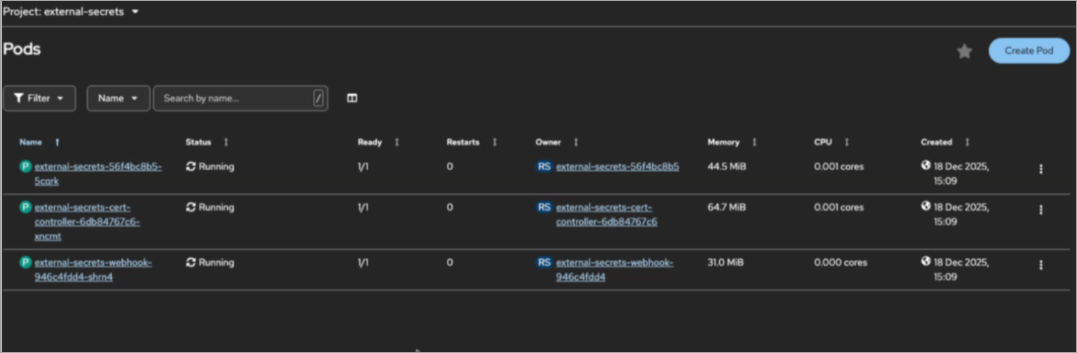
Step 2: Configuring Network Policies
By default, ESO deploys a deny-all-egress network policy. External secret providers, such as Delinea Secret Server, will fail without additional policies. The operator creates a deny-all-traffic network policy in the external-secrets namespace that blocks all egress traffic except:
-
API server (port 6443)
-
Cluster DNS (port 5353)
This blocks connectivity to external secret backends:
-
External DNS resolution (port 53)
-
HTTPS to external services (port 443)
To resolve this issue, create the following network policies:
-
To allow HTTPS egress traffic, create the following network policy:
CopyapiVersion: networking.k8s.io/v1
kind: NetworkPolicy
metadata:
name: allow-external-secrets-https-egress
namespace: external-secrets
spec:
podSelector:
matchLabels:
app.kubernetes.io/name: external-secrets
policyTypes:
- Egress
egress:
- to:
- ipBlock:
cidr: 0.0.0.0/0
ports:
- protocol: TCP
port: 443 -
To allow DNS egress traffic, create the following network policy:
CopyapiVersion: networking.k8s.io/v1
kind: NetworkPolicy
metadata:
name: allow-external-secrets-dns-egress
namespace: external-secrets
spec:
podSelector:
matchLabels:
app.kubernetes.io/name: external-secrets
policyTypes:
- Egress
egress:
- to:
- ipBlock:
cidr: 0.0.0.0/0
ports:
- protocol: UDP
port: 53
- protocol: TCP
port: 53 -
Apply these network policies:
oc apply -f allow-https-egress.yamloc apply -f allow-dns-egress.yaml -
To test connectivity to an external website (for example, www.google.com), run:
POD=$(oc get pods -n external-secrets -o jsonpath='{.items[0].metadata.name}')oc exec -n external-secrets $POD -- curl -I https://www.google.com
Step 3: Creating a ClusterSecretStore Configuration
For detailed information about configuring Kubernetes ESO for the integration with Secret Server or the Delinea Platform, see Configuring Kubernetes ESO.
You create a ClusterSecretStore configuration to provide the information about how to access Secret Server as an external secret provider: the Secret Server URL and credentials. Delinea Secret Server uses credential-based authentication.
To create a ClusterSecretStore configuration:
-
Create a Kubernetes secret to store the Secret Server credentials:
oc create secret generic secretserver-credentials --from-literal=username='<username>' --from-literal=password='<password>' -n openshift-operators -
Create a
ClusterSecretStoreresource:CopyapiVersion: external-secrets.io/v1beta1
kind: ClusterSecretStore
metadata:
name: delinea-secretserver
spec:
provider:
secretserver:
serverURL: https://your-tenant.secretservercloud.com/
username:
secretRef:
name: secretserver-credentials
key: username
namespace: openshift-operators
password:
secretRef:
name: secretserver-credentials
key: password
namespace: openshift-operators
Step 4: Creating an ExternalSecret Configuration
For detailed information about creating an ExternalSecret configuration, see Specifying the Secrets to Fetch from Secret Server or Secret Server on the Delinea Platform in the Integrating Kubernetes ESO with Delinea documentation.
You create an ExternalSecret configuration to describe the secret that you want to fetch from Secret Server into Kubernetes.
To create an ExternalSecret configuration:
-
Create and apply the following YAML file:
CopyapiVersion: external-secrets.io/v1beta1
kind: ExternalSecret
metadata:
name: database-secret
namespace: my-app
spec:
refreshInterval: 10m
secretStoreRef:
kind: ClusterSecretStore
name: delinea-secretserver
target:
name: database-secret
creationPolicy: Owner
data:
- secretKey: username
remoteRef:
key: "123"
property: username
- secretKey: password
remoteRef:
key: "123"
property: password


