Configuring Delinea Secret Server
To configure Delinea Secret Server Cloud for the integration with Microsoft Defender for Identity:
-
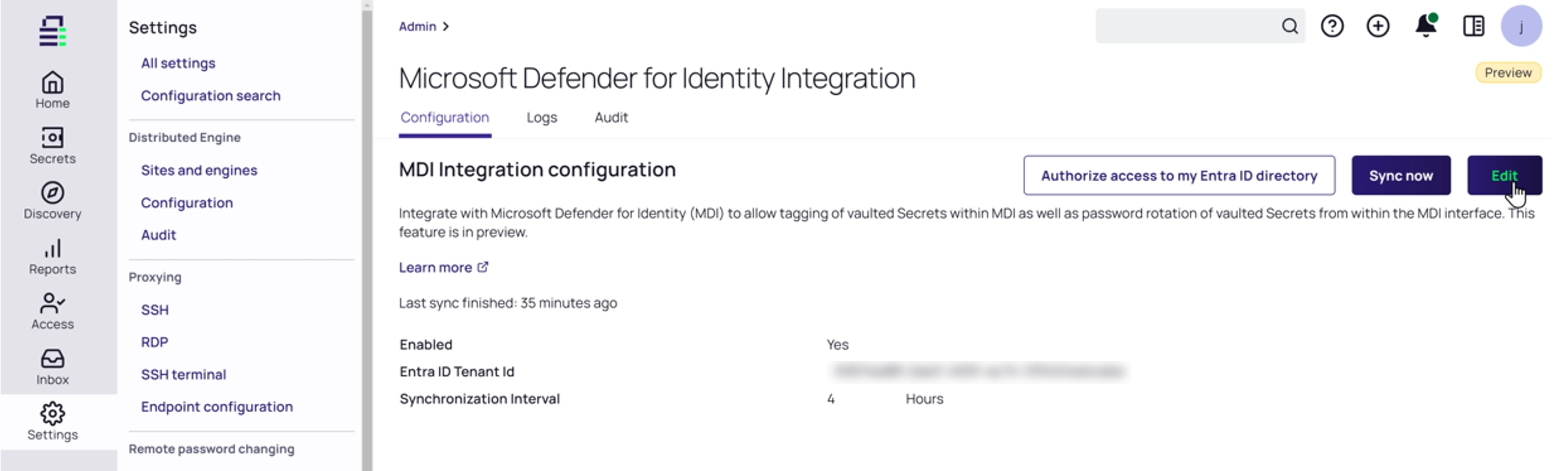
In Secret Server go to the Settings panel and select the Microsoft Defender for Identity integration option. The Microsoft Defender for Identity Integration configuration page appears.
-
On the Configuration tab, take the following actions to enable the integration:
-
Select Enable.
-
Specify your Entra ID Tenant Id.
-
Specify a synchronization interval (set in hours).
-
Select Save.
-
Select the Authorize access to my Entra ID directory link and grant access.
-
Once you have selected the link, use your Global Admin account to register the app by following the Microsoft instructions on the screen.
Information retrieval from on-premises AD controllers works with the existing configured domains through the installed Delinea Distributed Engine.
To perform a password rotation in Secret Server, you need to configure:


