Setup
To set up the integration between Azure DevOps and Delinea Secret Server, perform the following tasks:
Install the Azure DevOps Task Extension
Install Directly from Visual Studio Marketplace (Recommended)
-
Click the Delinea Azure DevOps Task.
-
Click Get it free and select your Azure DevOps organization.
-
Select an Azure DevOps organization from the dropdown.
-
Select Download.
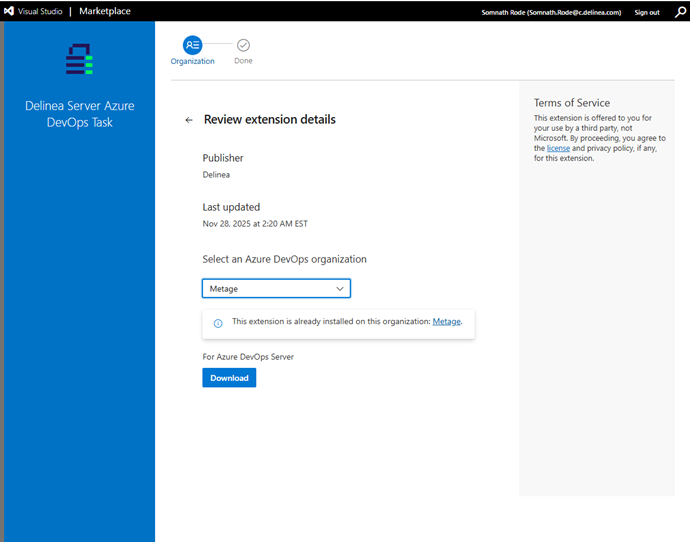
-
If your organization allows direct installs, the extension will be added automatically and appear in your task catalog as Delinea Secret Server Task.
-
Sign in to your Azure DevOps organization as an administrator.
-
Go to Organization Settings > Extensions > Manage Extensions.
-
The installed extension is now appearing in the Installed Extensions list.
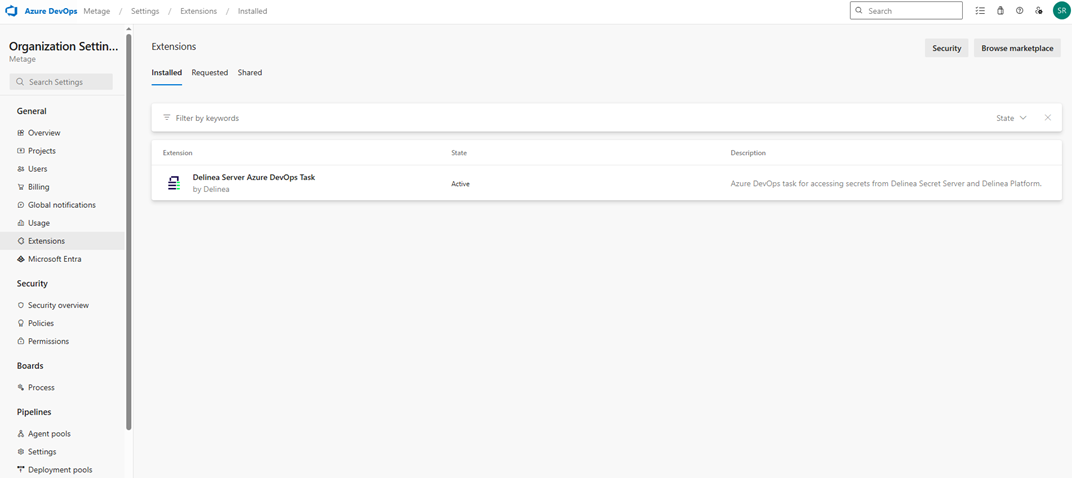
After installation completes, verify that Delinea Secret Server Task appears in your task catalog. For more information about how to install extensions, see the Install extensions topic in the Microsoft documentation.
Prepare Azure DevOps Pipeline
To add the task to your pipeline:
-
Open or create a Build or Release pipeline in Azure DevOps.
-
Click + Add in the pipeline stage where you want to retrieve secrets.
-
Search for Delinea Secret Server Task and add it to the stage.
-
Place it before any tasks that require secrets.
To learn more about tasks and how to add those to a pipeline, go here.


