Configuration
To configure GitLab for the integration with Secret Server, perform the following tasks:
-
Create or identify an application account or service account
-
Grant the account View permission on target secrets
-
Create the .gitlab-ci.yml file
-
Add CI/CD variables
-
Define the DELINEA_RETRIEVE variable
-
Configure the pipeline
The following sections describe how to perform these tasks.
Configuring Secret Server or the Delinea Platform
To configure Secret Server or the Delinea Platform for the integration with GitLab, you must set up an application account or service account that the integration uses to retrieve secrets.
- Create or identify an application account or service account. For more information on how to create these accounts, see the Delinea Platform documentation or the
- Secret Server documentation
- Ensure that the account has View permission on the target secrets.
Configuring GitLab
To configure GitLab for the integration with Secret Server, you must configure your GitLab project, define CI/CD variables, and create a pipeline definition.
Step 1: Creating the .gitlab-ci.yml File
GitLab pipelines are defined using a file named .gitlab-ci.yml located at the root of the repository.
You can create this file using the GitLab UI or locally.
Option A: Create the file using the GitLab UI
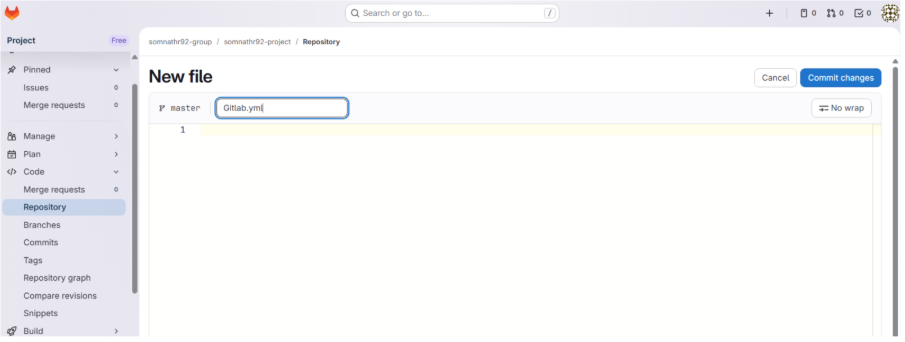
- Go to Repository > Files.
- Expand the plus sign and then elect New file.
- Enter
.gitlab-ci.ymlas the file name. - Add the pipeline content.
- Click Commit changes to commit the file to your branch (for example,
main).
Option B: Create the file locally
- Create a file named
.gitlab-ci.ymlin the root of your local repository. - Commit and push the file using the following git commands:
git add .gitlab-ci.yml
git commit -m "Add GitLab CI pipeline"
git push
Step 2: Adding the CI/CD Variables
To configure variables required for the integration:
-
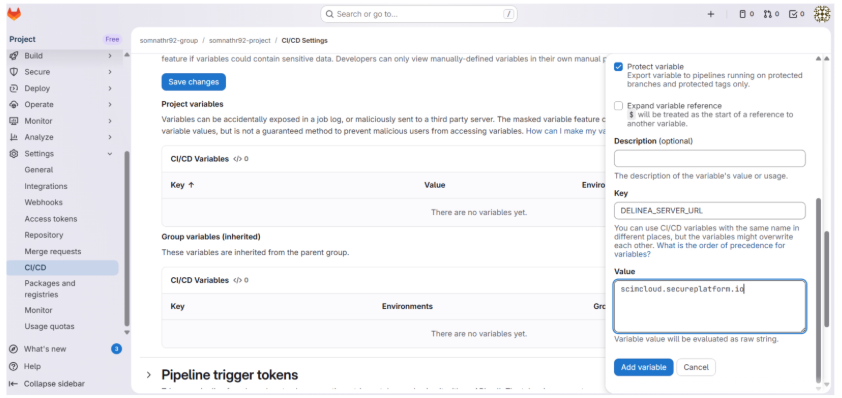
In your GitLab project, go to Settings > CI/CD.
-
Expand the Variables section.
-
Select Add variable.
-
Enter the variable details:
-
Key: Variable name (for example, DPSS_SERVER_URL)
-
Value: The corresponding value
-
Type: Variable (default)
-
Environment scope: All (default)
-
Protect variable: Check this for DPSS_CLIENT_ID and DPSS_CLIENT_SECRET
-
Mask variable: Check this for DPSS_CLIENT_ID and DPSS_CLIENT_SECRET
-
-
Select Add variable.
-
Repeat steps 3-5 for each required variable.
Required CI/CD Variables
The following table lists the CI/CD variables required for the integration.
| Variable Name | Description | Example Value | Security Setting |
|---|---|---|---|
| DPSS_SERVER_URL | The URL of your Delinea Secret Server instance | https://your-instance.secretservercloud.com | Visible or Masked |
| DPSS_CLIENT_ID | Application account or service account username | integration_user | Masked and Protected |
| DPSS_CLIENT_SECRET | Application account or service account password | [secure password] | Masked and Protected |
| DPSS_DOMAIN | Domain for Secret Server On-Premises (optional for Cloud) | COMPANY | Visible |
| DELINEA_RETRIEVE | JSON configuration mapping secrets to environment variables | See Define the DELINEA_RETRIEVE variable |
Visible |
Defining the DELINEA_RETRIEVE Variable
The DELINEA_RETRIEVE variable defines how secrets retrieved from Delinea are mapped to
environment variables in GitLab.
In the JSON configuration, you specify the secretKey to retrieve from Delinea and the
corresponding outputVariable. The value defined in outputVariable is created
as an environment variable and must be uppercase.
[
                {
                "secretPath": "ci:database:prod",
                "secretKey": "password",
                "outputVariable": "DB_PASSWORD"
                },
                {
                "secretId": "1025",
                "secretKey": "api_key",
                "outputVariable": "SECRET_API_KEY"
                }
        ]
You can retrieve secrets using either a folder-based secret path or a unique secret ID.
- SecretPath: Retrieves a Delinea secret using its folder-based path (for example: folder:subfolder:secret)..
- SecretID: Retrieves a Delinea secret using the unique secret ID.
Step 3: Configuring the Pipeline
The integration uses a two-step process consisting of a Retrieval Job and a Consumer Job.
stages:
  - test-stage

variables:
  CI_DEBUG_TRACE: "true"

# -------------------------------
# 1. Retrieve secrets using DPSS
# -------------------------------
dpss_retrieve_secrets:
  image: delineaxpm/dpss-gitlab-action:latest
  stage: test-stage
  variables:
    DELINEA_RETRIEVE: '[{"secretId":"3327","secretPath":"","secretKey":"Domain","outputVariable":"DOMAIN"},{"secretId":"5624","secretPath":"","secretKey":"Password","outputVariable":"PASSWORD"}]'
  script:
    - echo "Running DPSS container..."
    - /app/dpss-gitlab-action
  artifacts:
    reports:
      dotenv: dpss_retrieve_secrets

# -------------------------------
# 2. Validate values
# -------------------------------
test:
  stage: test-stage
  needs:
    - job: dpss_retrieve_secrets
      artifacts: true
  script: |
    echo "--- Retrieved Values ---"
    echo "Domain: $DOMAIN"
    echo "Password length: $(echo -n "$PASSWORD" | wc -c)"

    if [ -z "$DOMAIN" ]; then echo " Domain is empty"; exit 1; fi
    if [ -z "$PASSWORD" ]; then echo " PASSWORD is empty"; exit 1; fi

    echo " All tests passed successfully!"
How the Pipeline Works:
dpss_retrieve_secrets job
-
Pulls the Delinea Docker image
-
Authenticates to Secret Server using the provided credentials
-
Retrieves secrets specified in DELINEA_RETRIEVE
-
Creates a secrets.env file containing the environment variables
-
Passes the file as a dotenv artifact to subsequent jobs
test job
-
Depends on the dpss_retrieve_secrets job
-
Automatically receives environment variables from the dotenv artifact
-
Uses the retrieved secrets (for example, $DOMAIN, $PASSWORD)
-
Performs validation or deployment tasks
The variables block in the dpss_retrieve_secrets job explicitly references the CI/CD variables configured in GitLab. This ensures they are available to the Docker container during execution.


