Configuration
To configure GitHub for the integration with Secret Server, perform the following tasks:
-
Create or identify an application account or service account
-
Grant the account View permission on target secrets
-
Create the workflow YAML file
-
Add GitHub Secrets and Variables
-
Define the DPSS_RETRIEVE variable
-
Configure the workflow
The following sections describe how to perform these tasks.
Configuring Secret Server or the Delinea Platform
To configure Secret Server or the Delinea Platform for the integration with GitHub, you must set up an application account or service account that the integration uses to retrieve secrets.
- Create or identify an application account or service account. For more information on how to create these accounts, see the Delinea Platform documentation or the Secret Server documentation
- Ensure that the account has View permission on the target secrets.
Configuring GitHub
To configure GitHub for the integration with Secret Server, you must configure your GitHub repository, define secrets and variables, and create a workflow definition.
Step 1: Creating the Workflow YAML File
GitHub workflows are defined using YAML files located in the .github/workflows/ directory of the repository.
You can create this file using the GitHub UI or locally.
Option A: Create the file using the GitHub UI
- Go to Actions in your repository.
- Select New workflow or set up a workflow yourself.
- Create a file named
delinea-integration.yml(or any descriptive name). - Add the workflow content.
- Click Commit changes to commit the file to your branch (for example,
main).
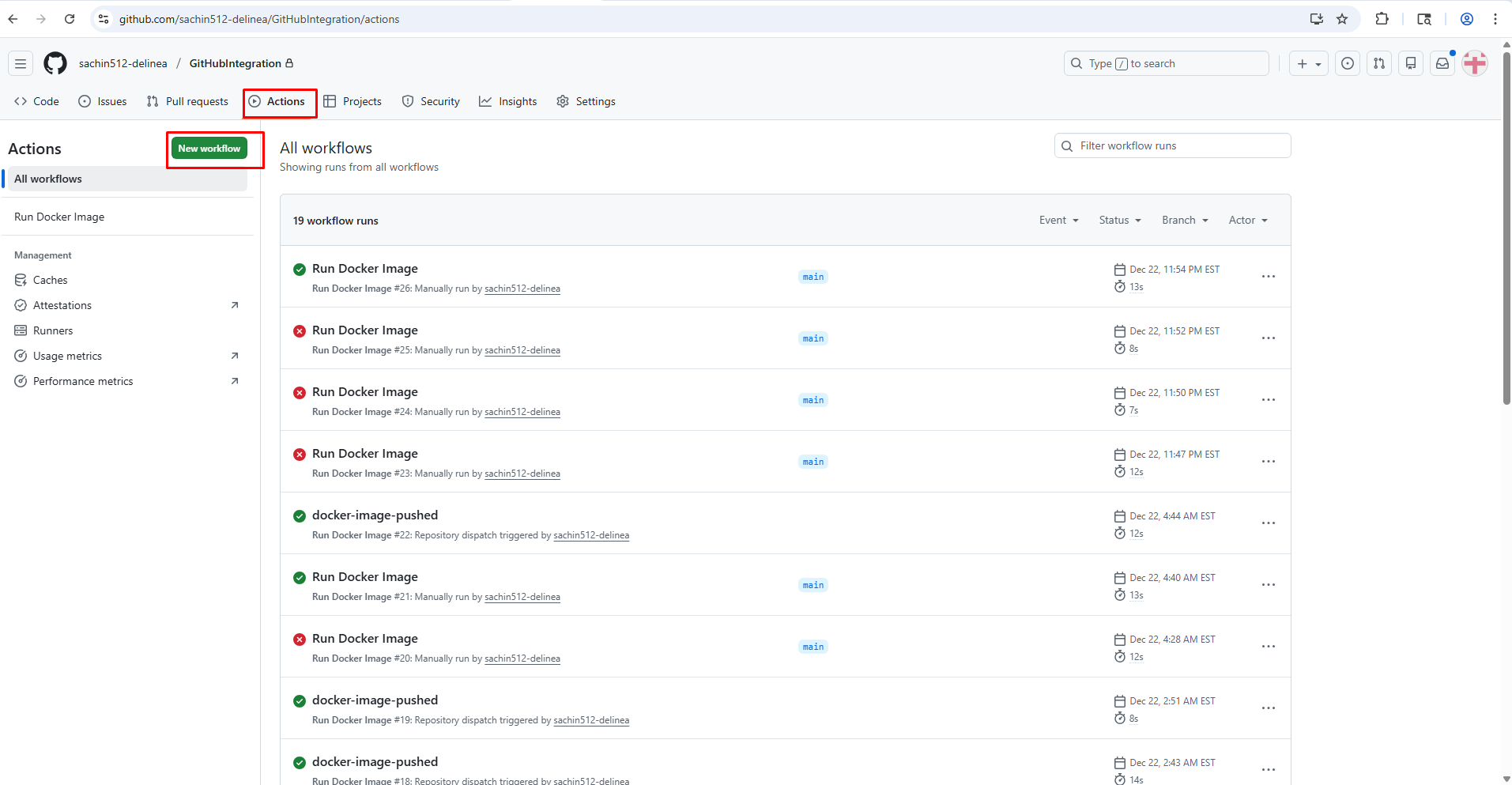
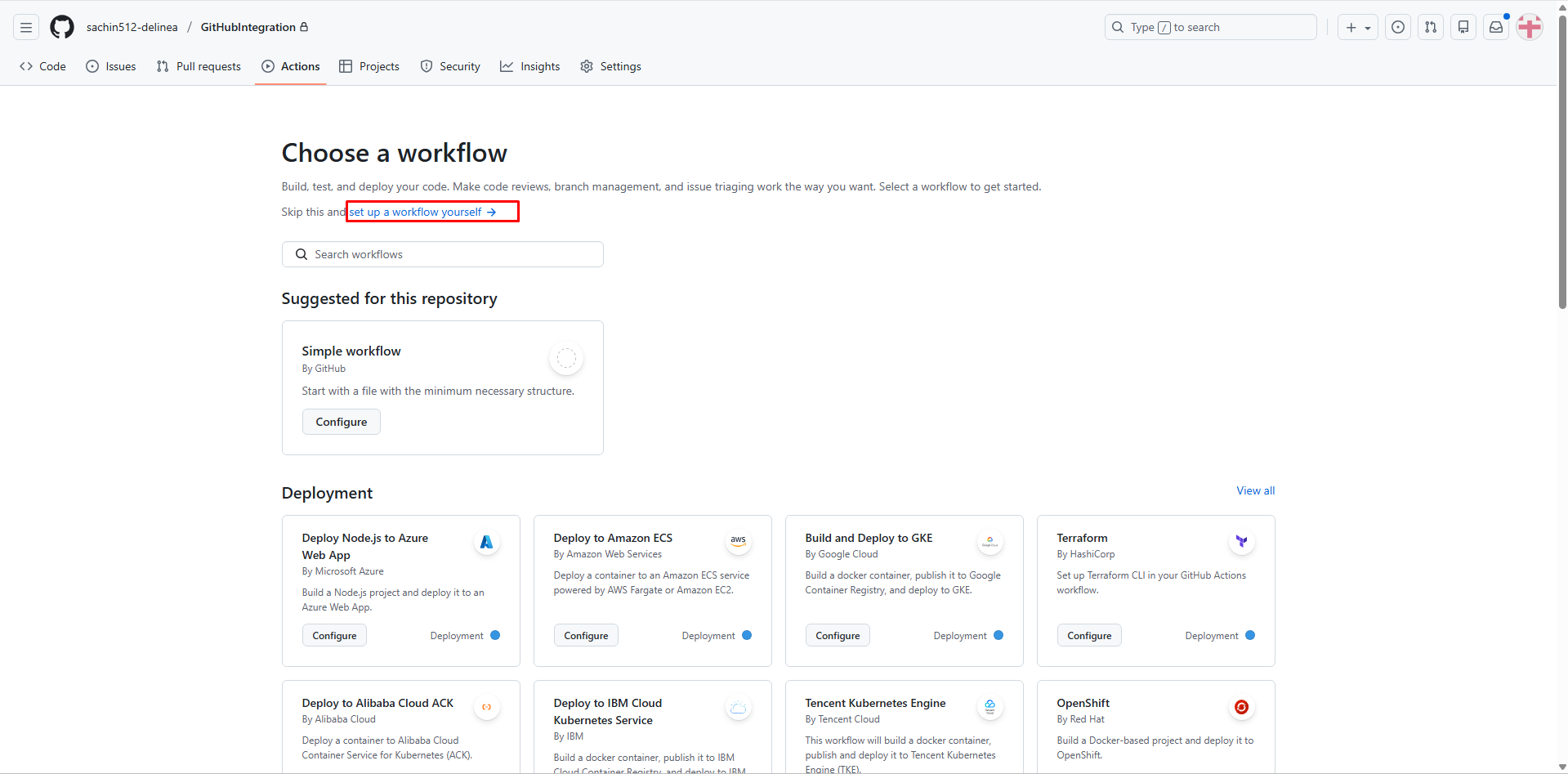
Option B: Create the file locally
- Create a directory structure
.github/workflows/in the root of your local repository. - Create a file named
delinea-integration.ymlin the workflows directory. - Commit and push the file using the following git commands:
git add .github/workflows/delinea-integration.yml
git commit -m "Add GitHub workflow for Delinea integration"
git push
Step 2: Adding GitHub Secrets and Variables
To configure secrets required for the integration:
-
In your GitHub repository, go to Settings > Secrets and variables > Actions.
-
Select the Secrets tab.
-
Select New repository secret.
-
Enter the secret details:
-
Name: Secret name (for example, DPSS_SERVER_URL)
-
Secret: The corresponding value
-
-
Select Add secret.
-
Repeat steps 3-5 for each required secret.
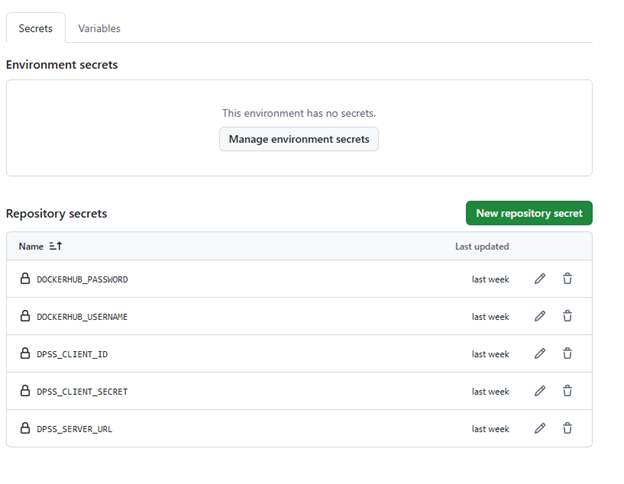
Required GitHub Secrets
The following table lists the GitHub secrets required for the integration.
| Secret Name | Description | Example Value | Security Setting |
|---|---|---|---|
| DPSS_SERVER_URL | The URL of your Delinea Secret Server instance | https://your-instance.secretservercloud.com | Masked |
| DPSS_CLIENT_ID | Application account or service account username | integration_user | Masked |
| DPSS_CLIENT_SECRET | Application account or service account password | [secure password] | Masked |
| DPSS_DOMAIN | Domain for Secret Server On-Premises (optional for Cloud) | COMPANY | Masked |
| DPSS_RETRIEVE | JSON configuration mapping secrets to environment variables | See Define the DPSS_RETRIEVE variable |
Not applicable |
Defining the DPSS_RETRIEVE Variable
The DPSS_RETRIEVE variable defines which secrets are retrieved from Delinea and how they are mapped to environment variables in the workflow.
Each entry includes:
-
secretPath or secretId
-
secretKey
-
outputVariable
In the JSON configuration, you specify the secretKey to retrieve from Delinea and the
corresponding outputVariable. The value defined in outputVariable is created
as an environment variable and must be uppercase.
[
                {
                "secretPath": "ci:database:prod",
                "secretKey": "password",
                "outputVariable": "DB_PASSWORD"
                },
                {
                "secretId": "1025",
                "secretKey": "api_key",
                "outputVariable": "SECRET_API_KEY"
                }
            ]
You can retrieve secrets using either a folder-based secret path or a unique secret ID.
- secretPath: Retrieves a Delinea secret using its folder-based path (for example: folder:subfolder:secret).
- secretId: Retrieves a Delinea secret using the unique secret ID.
Both methods can be combined in the same DPSS_RETRIEVE configuration.
Step 3: Configuring the Workflow
The integration uses a workflow that pulls the Docker image, retrieves secrets from Delinea, and validates the integration.
name: Build with Delinea secrets

                on:
                push:
                branches: [main]

                jobs:
                build:
                runs-on: ubuntu-latest
                steps:
                - name: Check out source
                uses: actions/checkout@v4

                - name: Retrieve secrets from Delinea
                env:
                DPSS_RETRIEVE: |
                [
                {"secretId":"1025","secretKey":"api_key","outputVariable":"SECRET_API_KEY"},
                {"secretPath":"ci:database:prod","secretKey":"password","outputVariable":"DB_PASSWORD"}
                ]
                run: |
                docker run --rm \
                -e DPSS_SERVER_URL="${{ secrets.DPSS_SERVER_URL }}" \
                -e DPSS_CLIENT_ID="${{ secrets.DPSS_CLIENT_ID }}" \
                -e DPSS_CLIENT_SECRET="${{ secrets.DPSS_CLIENT_SECRET }}" \
                -e DPSS_RETRIEVE="$DPSS_RETRIEVE" \
                -e GITHUB_ENV=/github_env \
                -v "$GITHUB_ENV:/github_env" \
                delineaxpm/dpss-github-action:latest

                - name: Mask retrieved secrets in logs
                run: |
                echo "::add-mask::$SECRET_API_KEY"
                echo "::add-mask::$DB_PASSWORD"

                - name: Use the retrieved secrets
                run: |
                # SECRET_API_KEY and DB_PASSWORD are now in the environment.
            curl -fsS -H "Authorization: Bearer $SECRET_API_KEY" https://api.example.com/health
How the Workflow Works:
-
Check out source step: Checks out the repository to subsequent build steps can use it.
-
Retrieve secrets from Delinea step: Runs the
delineaxpm/dpss-github-actioncontainer withDPSS_SERVER_URL,DPSS_CLIENT_ID, andDPSS_CLIENT_SECRETfrom GitHub secrets, and aDPSS_RETRIEVE JSONdescribing which Secret Server secrets to fetch. The container writes the retrieved values to$GITHUB_ENV(bind-mounted into the container) so they appear as environment variables in later steps. -
Mask retrieved secrets in logs step: Calls
::add-mask::on each retrieved value so GitHub Actions redacts it from workflow logs. This is required because values written to$GITHUB_ENVfrom inside a container are not auto-masked. -
Use the retrieved secrets step: Demonstrates using the retrieved secrets (SECRET_API_KEY, DB_PASSWORD) in a subsequent command. Replace this step with your real build/deploy logic.


