Configuring Blue Prism
To configure Blue Prism for the integration with Secret Server, complete the following steps in the specified order:
-
Step 1: Configure a connection to Secret Server or the Delinea Platform in Blue Prism.
-
Step 2: Create a Blue Prism environment variable to read the Secret Server connection information for use within your workflow.
-
Step 3: Generate an access token to use it to authenticate API calls to Secret Server or Secret Server on the Delinea Platform for retrieval of credentials.
The following sections describe how to perform these steps.
The Workflow Reference section provides reference information about the workflows contained in the Delinea extension that implement the supported use cases.
Step 1: Configuring a Secret Server or Delinea Platform Connection in Blue Prism
To configure a connection to your Secret Server or Delinea Platform instance from Blue Prism, you must create a credential entry in Blue Prism. The credential entry that you create stores the following information:
-
The Secret Server or Delinea Platform server URL
-
The username of the application account to use for accessing Secret Server or the username of the service user to use for accessing the Delinea Platform.
-
The password of the application account to use for accessing Secret Server or the password of the service user to use for accessing the Delinea Platform.
To create a connection credential entry in Blue Prism:
-
Log in to Blue Prism Robotic Process (RPA) software.
-
In Blue Prism RPA, in the navigation bar on the left, select System.
-
In the tree, under Security, select Credentials.
-
Under Credentials in the pane on the right, select New.
-
In the Credential Details window, enter the name for the credential entry (for example, "Delinea.Platform.SecretServer) and an optional description of the entry.
-
On the Application Credentials tab, enter the username and password to use to connect to your Secret Server or Delinea Platform instance. Under Additional Properties, also provide the following information:
- manage_username: The username of the Secret Server application account or the username of the Delinea Platform service user.
- manage_password: The password of the Secret Server application account or the password of the Delinea Platform service user.
- server_url: The Secret Server URL, for example, https://yourTenantName.secretservercloud.com/ for Secret Server or `https://yourtenantname.delinea.app for the Delinea Platform.
Be sure to put a slash (/) at the end of the URL.
-
Go to the Access Rights tab and provide the following information to configure access rights for Blue Prism bots:
-
Security Roles: Select All Roles.
-
Processes (legacy): Select Delinea_Login to enable Blue Prism Login Agent to log in to remote machines by using the credentials retrieved from Secret Server.
-
Resources (legacy): Select the names of the machines that you want Login Agent to log in to by using the credentials retrieved from Secret Server.
-
-
In the Credential Details window, select OK to complete the creation of the credential entry.
Step 2: Creating a Blue Prism Environment Variable for the Server Credentials
You must create an environment variable in Blue Prism to reference the credential entry that stores the Secret Server or Delinea Platform connection information (the server URL, username, and password). When running a workflow, Blue Prism will use the environment variable as an input parameter to retrieve the connection information from the credential entry and authenticate with the Secret Server APIs.
To create a Blue Prism environment variable:
-
In Blue Prism, navigate to System > Processes - Environment Variables.
-
On the right side of the window, select Add Variable.
-
In a new row in the environment variables table, provide the following information for the new environment variable:
-
Name: Enter CredentialName.
-
Type: Select Text.
-
Value: Enter the name of the credential entry that you created in Blue Prism (for example, "Delinea_Secret_Server").
-
-
Select Apply.
Step 3: Generating an Access Token
To generate an access token to authenticate API calls to Secret Server or Secret Server on the Delinea Platform, you must run the GetTokenAndServerURL workflow. The or workflows reference the GetTokenAndServerURL workflow to retrieve the generated access token and use it to authenticate with the Secret Server APIs.
To generate an access token:
-
In Blue Prism RPA, on the top bar, select Studio.
-
In the tree, under Objects, select Delinea.Platform.Secret Server to open the Object Studio screen.
-
At the top of the screen, select GetTokenAndServerURL.
-
At the top of the flowchart for the GetTokenAndServerURL workflow, double-click the first parallelogram shape to the right of the Start shape.
-
In the Exposure drop-down list, select Environment - Read the corresponding Environment Variable from System Manager, and in the Name drop-down list at the top, select the name of the environment variable that references the credential entry with the Secret Server connection information.
-
On the debug toolbar at the top of the Object Studio screen, select
 to run the workflow.
Depending on the server URL provided in the credential entry ( a Delinea Platform URL or Secret Server URL), from the
IsPlatformdecision shape, execution will proceed down the platform flow (the right branch) or the Secret Server flow (the left branch).The generated access token is retrieved to the Token variable at the end of the flowchart and will be used by the other workflows.
Workflow Reference
The Delinea Secret Server integration package provides several prebuilt workflows that implement the use cases supported by this integration. Some of these workflows directly implement the use cases and are called main workflows. You execute the appropriate main workflow for your use case. The main workflows reference supporting workflows to get input data, such as a secret ID, credentials, and an access token, from them during execution.
The main and supporting workflows use the following input parameters.
| Parameter | Description |
|---|---|
| CredentialName | The name of the environment variable that references the created credential entry. |
| ID or SecretID |
The secret ID to search for. To find the secret ID in Secret Server or the Delinea Platform, navigate to the secret details page and note the secret ID in the URL at the top (it appears after |
| Name | The secret name to search for. |
| TemplateId |
The ID of the secret template to search for. In Secret Server, to find the secret template ID, navigate to the template details page from the Secret templates page and note the secret ID in the URL at the top (it appears after |
The following sections provide details about the main workflow that implements each supported use case and details about its supporting workflows.
Use Case "Retrieve Credentials from Secret Server to Automatically Log in to a Remote Computer with the Credentials"
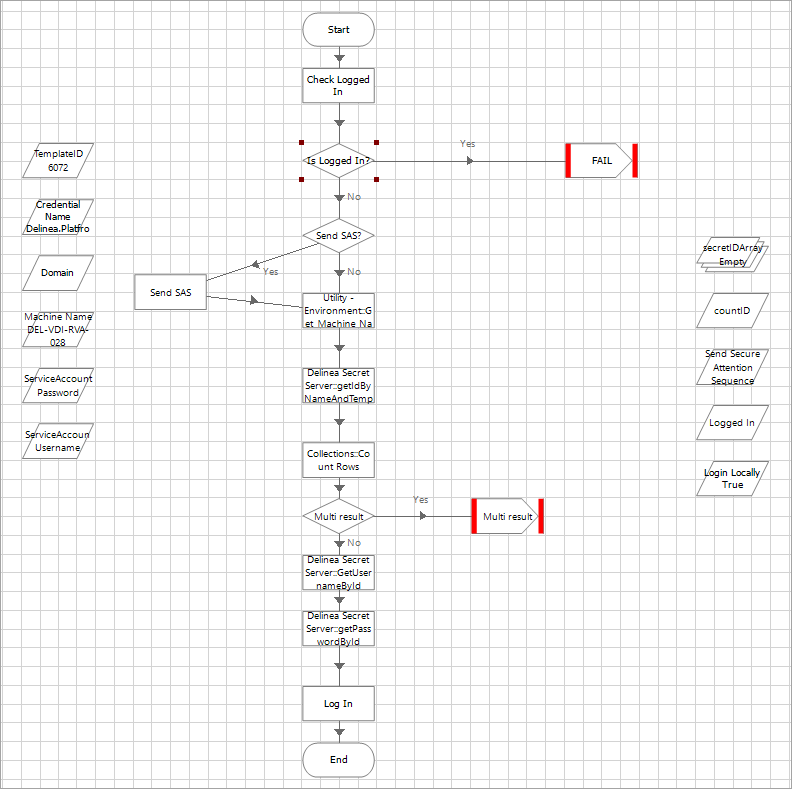
To implement this use case, you need to execute the Delinea_Login main workflow. Following are the details of the Delinea_Login main workflow.
Flowchart that represents the Delinea_Login workflow
Input parameters for the main workflow
-
TemplateID
Output of the main workflow
The Delinea_Login workflow returns the credentials (username and password) to use to log in the computer.
Supporting workflows
The following table provides details about the supporting workflows referenced by the Delinea_Login workflow. Each supporting workflow includes an action that makes a request to a specific Secret Server API endpoint to retrieve specified secret data.
| Supporting Workflow | Description | Input Parameters for the Workflow | API Request | Output |
|---|---|---|---|---|
getIdByNameAndTemplate
|
This workflow retrieves a secret ID by secret name and secret template. |
|
The workflow sends a request to the Secret Server Search Secrets API. | A collection of records from Secret Server containing the secret ID for the specified secret name and template. |
GetUsernameById
|
This workflow retrieves the username from a secret by secret ID. |
|
The workflow sends a request to the Secret Server Get Secret API. | The username from the secret with the specified secret ID. |
getPasswordById
|
This workflow retrieves the password from a secret by secret ID. |
|
The workflow sends a request to the Secret Server Get Secret API. | The password (an invisible string) from the secret with the specified secret ID. |
GetTokenAndServerURL
|
This workflow retrieves an access token from Secret Server or the Delinea Platform to authenticate API requests to Secret Server. The Delinea_Login main workflow does not directly reference the GetTokenAndServerURL workflow, but the supporting workflows reference it to get an access token. |
CredentialName | The workflow sends a request to the Secret Server Authentication API or the Delinea Platform Identity Authorization API. | An access token (a bearer token string). |
Use Case "Retrieve Credentials for Use in an Automation Workflow"
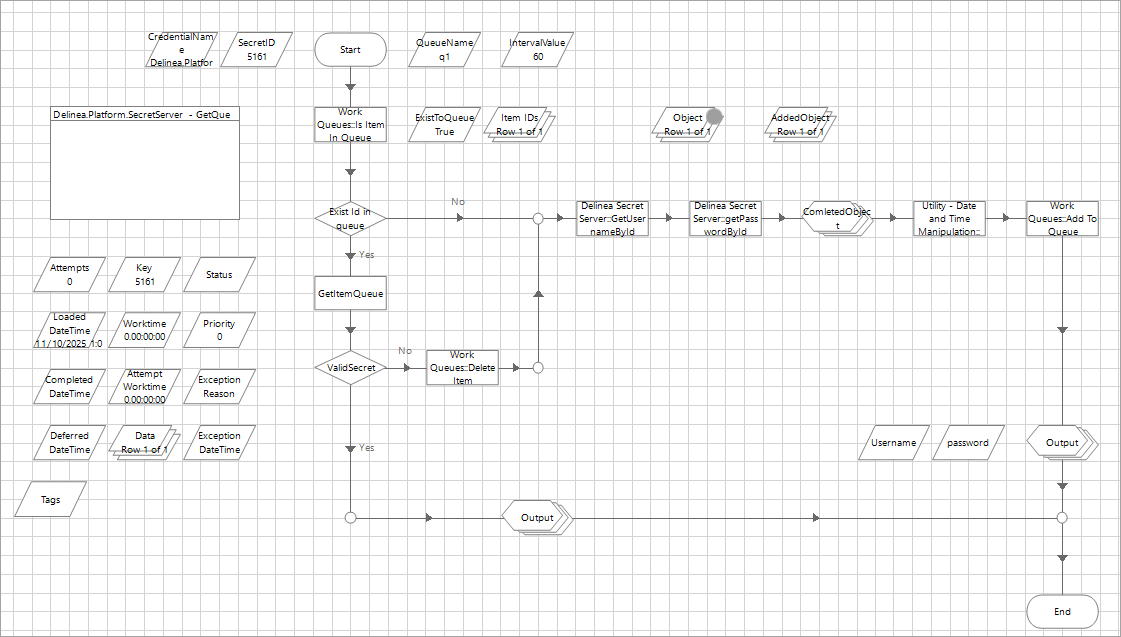
To implement this workflow, execute the GetQueue main workflow.
Flowchart that represents the GetQueue workflow
Input parameters for the main workflow
- SecretID
-
CredentialName
Output of the main workflow
The GetQueue workflow returns the username and password from the specified secret ID.
Supporting workflows
The following table provides details about the supporting workflows referenced by the GetQueue workflow. Each supporting workflow includes an action that makes a request to a specific Secret Server API endpoint to retrieve specified secret data.
| Supporting Workflow | Description | Input Parameters for the Workflow | API Request | Output |
|---|---|---|---|---|
GetUsernameById
|
This workflow retrieves the username from a secret by secret ID. |
|
The workflow sends a request to the Secret Server Get Secret API. | The username from the secret with the specified secret ID. |
getPasswordById
|
This workflow retrieves the password from a secret by secret ID. |
|
The workflow sends a request to the Secret Server Get Secret API. | The password (an invisible string) from the secret with the specified secret ID. |
GetTokenAndServerURL
|
This workflow retrieves an access token from Secret Server or the Delinea Platform to authenticate API requests to Secret Server. The GetQueue main workflow does not directly reference the GetTokenAndServerURL workflow, but the supporting workflows reference it to get an access token. |
CredentialName | The workflow sends a request to the Secret Server Authentication API or the Delinea Platform Identity Authorization API. | An access token (a bearer token string). |


