Policies
Policies determine access to resources and the authority to work on resources. Sign into your DSV tenant. On the Home page, open the Administration drop-down to access Policies.
Viewing Policies
At the Administration drop-down, select Policies. A table of the currently defined Policies is displayed.
Use the filter icon at the far right of the table header to enable or disable columns included in the table. The search icon can be used to identify a specific Policy for display.
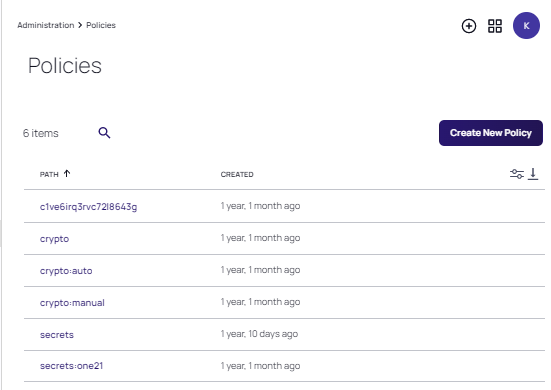
The following parameters are displayed for each Policy.
| Parameter | Value |
|---|---|
| PATH | The path to the policy. |
| CREATED | The time elapsed (in year/months/days/hours; or "just now") since the Policy was created. Hover over the value to display the date and time the Policy was created. |
Viewing Policy Details
Click any Policy in the table to access the Policy Details page.
Click Delete Policy to remove the currently displayed Policy.
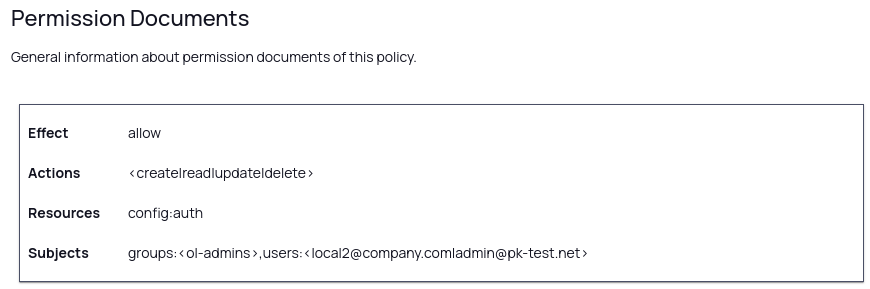
In addition to the basic information regarding the policy identifiers and dates, the Policy includes information for Permission Documents.
| Parameter | Value |
|---|---|
| Effect | Determines whether the permissions for the Policy are allowed (allow) or denied deny). |
| Actions | The actions (create, read, update, delete, list, assign) that are supported by the Policy. <.*> indicates all actions. Note: Basic policy functionality is currently supported, however, future enhancements to the UI for Policies will provide full functionality. Refer to the CLI Reference for robust Policy customization. |
| Resources | The resources affected by the Policy. Typically, this is the same value as the PATH, unless a more specific instance of resource applies. |
Creating a New Policy
- From the Policies page, click Create New Policy.
The Create permission is required for an account, in order to create a Policy.
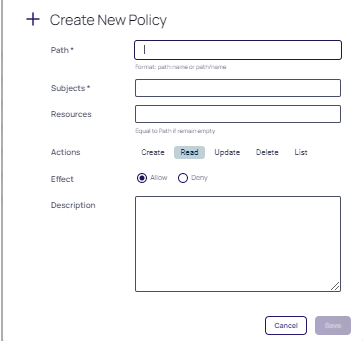
- At the Create New Policy dialog, provide the following parameters:
| Parameter | Value |
|---|---|
| Path | The path to the Policy. |
| Subjects | The users (groups or roles) that the Policy affects. |
| Resources | The Resources that the Policy affects. Typically, this is the same value as the PATH, unless a more specific instance of resource applies. |
| Actions | The actions (create, read, update, delete, list, assign) that are supported by the Policy. <.*> indicates all actions. |
| Effect | Controls whether the permissions for the Policy are allowed (allow) or denied (deny). |
| Description | A short narrative that identifies the Policy. |
- Click Save.


