Distributed Engine Routing for External Vaults
This page explains how to route external vault operations through a Distributed Engine (DE). You assign an external vault to a local site for direct web-server processing or to a non-local site to route through a DE. See the Key Definitions for what those terms map to in each deployment. The procedure is the same across all four supported external vault types; however, whether you need a DE and any provider-specific deployment notes — vary by vault type.
For broader Secret Server documentation, see the Secret Server Secret Server Help. For the per-vault integration guides, see External Secrets.
Key Definitions
This topic uses two terms for where vault calls run:
-
local site (lowercase, generic): The site option where Secret Server processes the vault call from its own web server with no DE in the path. Settings:
- Don't use a site on Secret Server Cloud
- Local on Secret Server (on-prem) with the site's Processing Location set to Web Site.
-
non-local site (lowercase, generic) : Any site that routes the call through a DE. Settings:
- Default on Secret Server Cloud
- Local on Secret Server (on-prem) with the site's Processing Location set to Distributed Engine,
- Any customer-created site on either deployment.
Site Deployment Settings
Secret Server On-Prem deployment site settings:
| Site Dropdown Option | Site's Processing Location | Where Calls Execute |
|---|---|---|
| Local (default) | Web site | Web server |
| Local | DE | DE on local (required) |
| Customer-created site | DE (only option in practice) | DE on that site (required) |
Secret Server Cloud deployment site settings:
| Site Dropdown Option | Where Calls Execute |
|---|---|
| Don't use a site | Cloud web server |
| Default | DE on default site (required — no web-server option here) |
| Customer-created Site | DE on that site (required) |
On cloud, the default option requires a DE. The on-prem "default" is the Local site set to Processing Location = Distributed Engine. On cloud, customer-private vaults always require a DE because the cloud web server has no path into the customer network.
The Short Version
| Your Situation | Action to Take |
|---|---|
| The vault endpoint is reachable from Secret Server's own web server, and your deployment allows web-server processing | Assign the vault to a local site. No DE |
| The vault is on a private network, behind a private endpoint, or in a VPC/VNet | Assign the vault to a non-local site whose DE can reach the vault |
| You are on Secret Server Cloud reaching your own private network | Assign the vault to a non-local site whose DE can reach the vault |
| Web-server processing is unavailable and Secret Server has no path to your private vault | Assign the vault to a non-local site whose Distributed Engine has the required network reachability. |
The non-local site's DE must have network reachability to the vault's endpoint and DNS resolution for the vault's hostname.
Why This Is Important
When an external vault is assigned to a local site, Secret Server's external secrets service makes outbound calls to the vault endpoint directly from Secret Server's own web server. That works whenever the web server can resolve and reach the vault's URL, which is the normal case for public-cloud endpoints like *.vault.azure.net, secretsmanager.<region>.amazonaws.com, or secretmanager.googleapis.com.
It does not work when:
- The vault is on a private network the web server cannot reach, such as self-hosted HashiCorp Vault behind a firewall, Azure Key Vault fronted by a Private Endpoint, or AWS Secrets Manager accessible only via a VPC interface endpoint.
- The Secret Server web server's outbound network access is restricted and cannot reach the vault's public endpoint.
A DE is a Secret Server component you deploy closer to the vault, that is, on a network with line-of-sight to the vault's endpoint. Assigning the vault to a non-local site tells Secret Server to dispatch the vault's operations to the DE on that site instead of making the calls from the web server.
How Routing Works
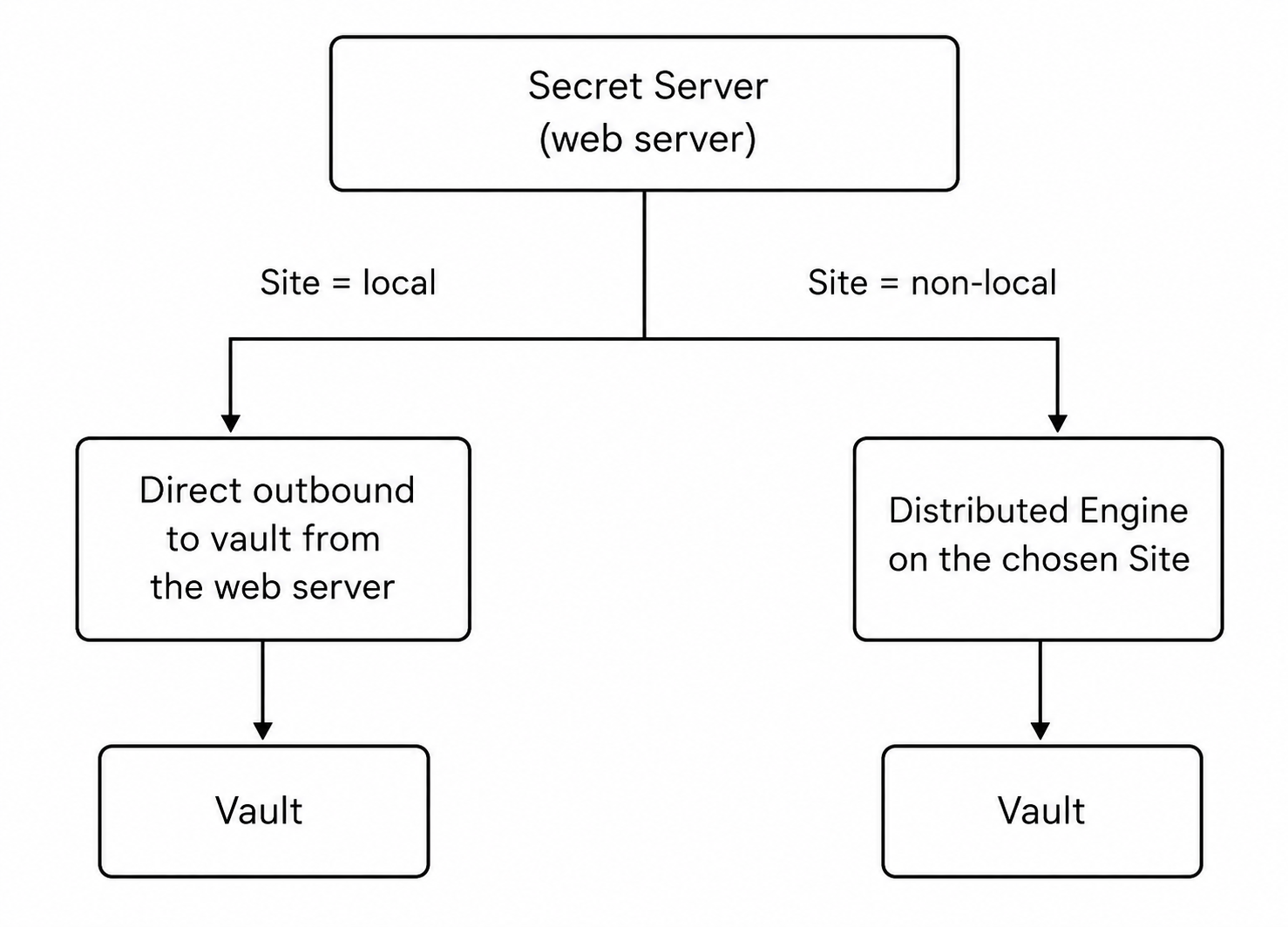
- local site: Operations execute from Secret Server's own web server. In the UI dropdown, this is Don't use a site (Cloud) or Local with Processing Location = Web Site (on-prem).
- non-local site: Operations route through the DE registered on that site. In the UI dropdown, this is Default (Cloud), any customer-created Site (either deployment), or Local with Processing Location = Distributed Engine (on-prem).
The choice is made per vault on the vault's edit page, so different external vault links can route differently—for example, a public HCP Vault dedicated cluster on a local site alongside a self-hosted vault on a non-local site inside the cluster's network.
Configuring Distributed Engine Routing
Prerequisites for a Site with Engine Processing
Before you can route a vault through a non-local site, that site must exist and have an active DE attached. See the Distributed Engine section of the Secret Server Secret Server Help for instructions on creating a site, installing the engine on a host with reach-ability to the vault's endpoint and DNS resolution for the vault's hostname, and confirming a healthy heartbeat.
On Secret Server Cloud, the default site exists by default and only needs an engine attached.
Assigning the Vault to a Non-Local Site
- Go to Secrets > External Secrets and open the external vault link.
- Select Edit.
- Change the Site dropdown from the local site to a non-local site with an engine that can reach the vault. The exact "from and to" labels depend on the deployment. See the Key Definitions at the top of the page.
- Save.
Subsequent pulls, pushes, and synchronization runs for that vault now dispatch to the DE on the assigned site.
Per-Vault Guidance
The mechanism is identical across vault types, but the trigger for needing it and the network plumbing on the engine side differ. On Secret Server Cloud, vaults on the customer's own private network always need a non-local site, regardless of vault type, because the cloud web server cannot route into the customer network.
Azure Key Vault
When you need it: AKV is fronted by a Private Endpoint, restricted to a specific VNet, or otherwise unreachable from the local site. On Secret Server Cloud, AKV restricted to a customer VNet always needs a non-local site whose DE is inside the VNet.
Deployment notes:
- Place the Distributed Engine on a network with reachability to the Private Endpoint (typically inside the VNet or peered to it).
- AKV's regional hostname (
<vault-name>.vault.azure.net) must resolve to the Private Endpoint's private IP from the Distributed Engine's perspective. Configure Azure Private DNS zones or your own DNS accordingly—Secret Server uses the regional hostname and relies on DNS to reach the Private Endpoint. - The engine needs outbound HTTPS (port 443) to the resolved private IP.
AWS Secrets Manager
When you need it: AWS Secrets Manager is reachable only via a VPC interface endpoint, restricted to a private subnet, or the Secret Server (on-prem) web server's egress is restricted. On Secret Server Cloud, secrets manager restricted to a customer VPC always needs a non-local site whose DE is inside the VPC.
Deployment notes:
- Place the Distributed Engine inside the VPC (or on a network with routing to the VPC interface endpoint).
- If you use a VPC interface endpoint for Secrets Manager, keep private DNS enabled on the endpoint. Secret Server uses the regional
secretsmanager.<region>.amazonaws.comhostname and relies on DNS to resolve it to the private endpoint IP inside the VPC. - The engine needs outbound HTTPS (port 443) to the resolved private IP.
HashiCorp Vault
When you need it: Self-hosted community or enterprise vault on a private network that the local site cannot reach. On Secret Server Cloud, a self-hosted cluster always needs a non-local site whose DE is on your network. Not required for HCP Vault Dedicated, which exposes internet-accessible endpoints. A local site suffices.
Deployment notes:
- Place the Distributed Engine on a network with reachability to the Vault cluster's listener address (default port 8200).
- DNS for the cluster hostname must resolve from the engine.
- If the cluster presents self-signed TLS certificates, enable Skip Certificate Validation on the external vault link, or import the cluster's CA into the engine host's trust store.
Google Cloud Secret Manager
When you need it: GCP Secret Manager endpoints are internet-accessible, so a DE is required only when the local site cannot reach the public internet, that is, on Secret Server (on-prem) with restricted egress or on Secret Server Cloud when policy requires calls to originate from the customer's own network rather than from Secret Server's cloud web server.
Deployment notes:
- Place the Distributed Engine on a network with outbound HTTPS access to
*.googleapis.com. - DNS resolution for
secretmanager.googleapis.comandcloudresourcemanager.googleapis.comis required from the engine. - No private endpoint configuration is needed unless your organization uses Private Google Access — in that case, configure DNS so
*.googleapis.comresolves to the private IPs used by Private Google Access.
Decision Matrix at a Glance
Secret Server (on-prem)
| External vault | Non-Local Site Required | Typical trigger |
|---|---|---|
| Azure Key Vault | No (only with private endpoint or restricted egress) | Private endpoint, VNet-only access |
| AWS Secrets Manager | No (only with VPC endpoint or restricted egress) | VPC interface endpoint, private subnet |
| HashiCorp Vault—HCP | No | Not applicable (HCP endpoints are public) |
| HashiCorp Vault—Community or Enterprise | Yes, if self-hosted on a private network | Self-hosted cluster behind firewall |
| Google Cloud Secret Manager | No (only if egress is restricted) | Restricted Secret Server outbound internet access |
Secret Server Cloud
| External vault | Non-Local Site Required | Trigger |
|---|---|---|
| Azure Key Vault | Only for VNet-restricted AKV | Private endpoint, VNet-only access (DE inside the VNet) |
| AWS Secrets Manager | Only for VPC-restricted secrets manager | VPC interface endpoint, private subnet (DE inside the VPC) |
| HashiCorp Vault—HCP | No | Public endpoints. Local site suffices unless policy requires otherwise. |
| HashiCorp Vault—Community / Enterprise | Yes—always | Self-hosted cluster on the customer's private network |
| Google Cloud Secret Manager | No | Public endpoints. Only needs a DE if policy requires calls to originate from the customer's network |
Verifying the Route
After assigning a non-local site to a vault:
-
Open the external vault link in Secret Server.
-
Trigger a manual Synchronize (or wait for the next scheduled pull).
-
Confirm:
- The Last pull status updates with the synchronization timestamp and result.
- The Distributed Engine's activity log shows the corresponding outbound call.
- If the pull fails, check engine-to-vault network reachability and DNS resolution first — those are the most common failure modes.
Common Pitfalls
- DNS mismatch: The engine resolves the vault hostname to a different address than the web server expects (or the wrong VPC/VNet). This is the most common cause of "Connected on the web server, fails on the engine" situations. Confirm
nslookupfrom the engine host returns the expected private IP. - Firewall asymmetry: The engine reaches the vault, but the response path is blocked by stateful firewall rules. Validate both directions when troubleshooting.
- Engine egress to public endpoints: A non-local site whose engine has no path to the public internet will work for vaults reachable on the customer's private network but will fail for any vault type that ultimately requires a public endpoint (HCP Vault Dedicated, GCP Secret Manager without Private Google Access). When choosing where to place the engine, confirm it can reach every endpoint the vault uses, not just the private ones.
- Engine connectivity: Pulls, pushes, and synchronization for a vault assigned to a non-local site depend on the DE being online and reachable. If the engine is offline or unreachable when an operation fires, the vault's Last pull status reflects the failure. Confirm engine health and heartbeat in Admin > Distributed Engine before retrying.
Related Topics
- External Secrets—overview of Secret Server's external vault model.
- Azure Key Vault Integration
- AWS Secrets Manager Integration
- HashiCorp Vault Integration
- Google Cloud Secret Manager Integration
- Secret Server online help — Distributed Engine


