Configuring Oracle Secret Templates
Secret Server has four Oracle secret templates, three current and one deprecated:
| Template | Status | TCPS | Requires ODAC | Use for |
|---|---|---|---|---|
| Oracle Account (Template Ver 2) | Current | No | No | New secrets on databases that don't require TCPS |
| Oracle Account (TCPS) | Current | Yes, with an Oracle wallet | No | Databases that require TCPS, when you can place wallet files on the Secret Server web servers or engines |
| Oracle Account (Walletless) | Current | Yes, over TLS without a wallet | No | Databases that require TCPS, when you can't deploy wallet files. TLS without a wallet is potentially less secure than wallet-based mutual TLS. |
| Oracle Account | Deprecated | No | Yes | Existing secrets only |
For an overview of every Oracle topic, see Oracle Database.
Introduction
Overview
Three of these templates, Oracle Account (Template Ver 2), Oracle Account (TCPS), and Oracle Account (Walletless), use the Oracle Managed Data Access library included with Secret Server. Unlike the legacy Oracle Account template, they do not require the Oracle Data Access Components (ODAC) or Oracle.DataAccess.dll to be installed alongside Secret Server or its engines. Two of them, TCPS and Walletless, support Oracle’s TCPS connection protocol. You can run the new templates alongside the legacy template, but use the new templates when creating new Oracle secrets.
DataSource Field
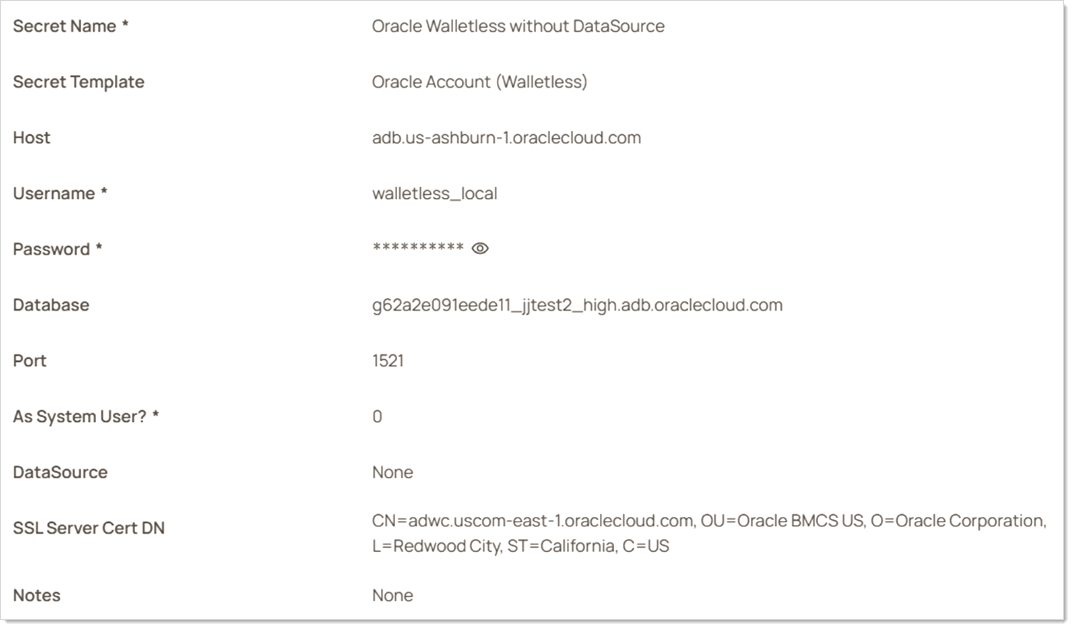
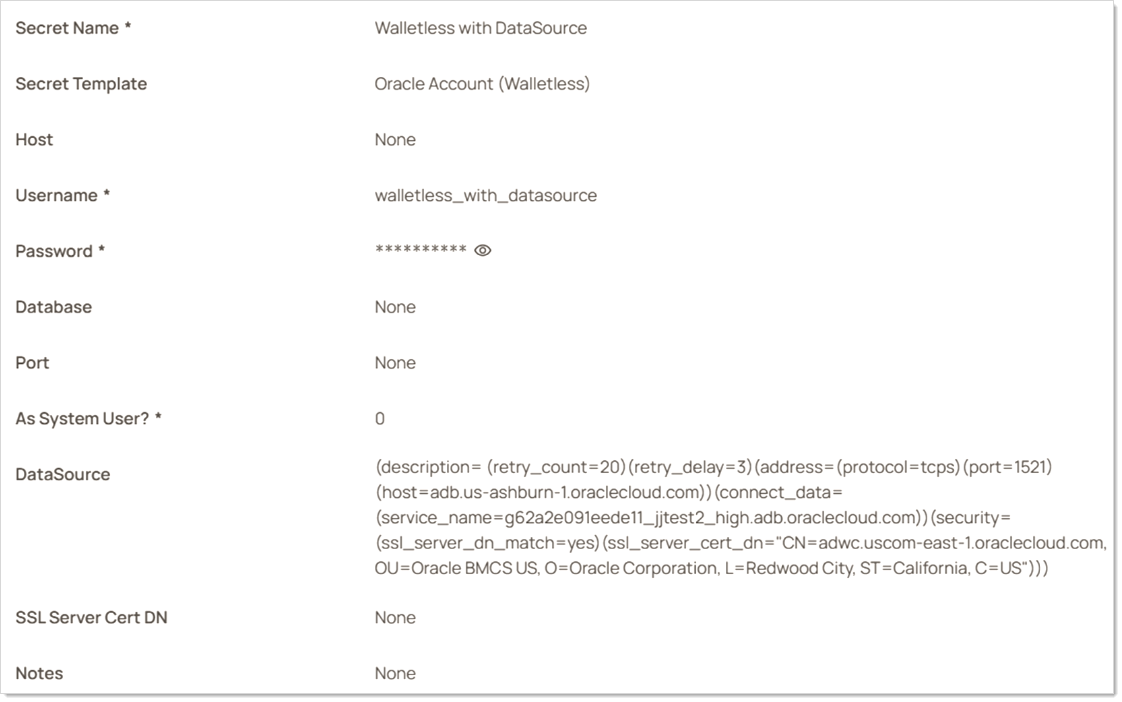
All three new templates include an optional DataSource field. The DataSource field acts like a connection string to the Oracle database. When used, it is not necessary to fill out the Host, Database, Port, or SSL Server Cert DN fields. On the secret template's page, "none" appears in each of those fields.
Without DataSource:
With DataSource:
As System User Field
All new templates also have the “As System User” field. It allows connections to the database as the system user. Setting this to “1” allows database connections with the SYSDBA privilege. Setting this to “0” connects with the default role.
Templates
Oracle Account
This is the deprecated original template, kept for existing secrets. It requires the Oracle Data Access Components (ODAC), including Oracle.DataAccess.dll, alongside Secret Server or its engines. See Configuring Oracle DB 19c for Heartbeat and RPC. Use Oracle Account (Template Ver 2) for new secrets.
Oracle Account (Template Ver 2)
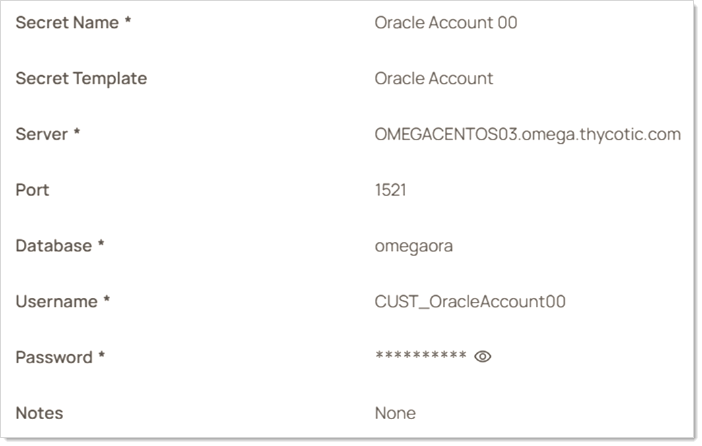
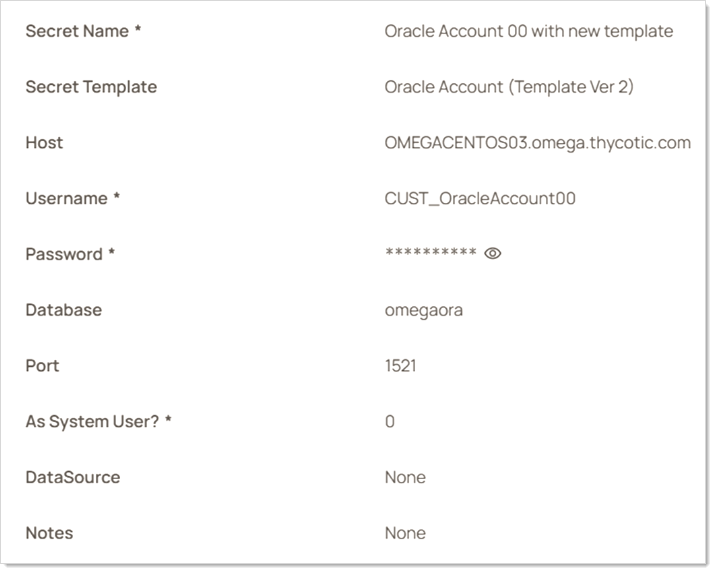
Oracle Account (Template Ver 2) is the closest equivalent to the original Oracle Account template. It does not support Oracle TCPS, but it does use the Oracle Managed Data Access NuGet library. The fields on this secret template are the same as in the original Oracle Account template with a few exceptions. It adds two fields, the DataSource and “As System User” fields described above. Additionally, the “Server” field is called “Host” in the new template to more closely match the terminology in Oracle’s connection string.
Original template:
New template:
See Oracle Account Secret Template for RPC for more on using this template.
Oracle Account (TCPS)
Overview
You can make TCPS connections using the "Oracle Account (TCPS)" secret template and an Oracle Wallet. As described by Oracle, “Oracle Wallet is a container that stores authentication and signing credentials.”
Wallet Location
Prior to setting up Oracle Account (TCPS) secrets, you will need to place copies of your Wallet files on the same server(s) as your Secret Server site(s) where you will have Oracle Account (TCPS) secrets. Afterwards, use the “Wallet Location” field to note the location of your wallet files on your newly created secret. Note that you will need to ensure that the user running Secret Server’s app pool (or engine when applicable) is granted read permissions to access the directory where the wallet is located.
TNS Admin
The “TNS Admin” field is optional. If you have a tnsnames.ora file, specify its containing directory in this field.
As with wallets, you should consult documentation specific to your Oracle database for information on using tnsnames.ora. However, in general, tnsnames.ora file is a configuration file containing network service names mapped to connect descriptors (for local naming method) or net service names mapped to listener protocol addresses.
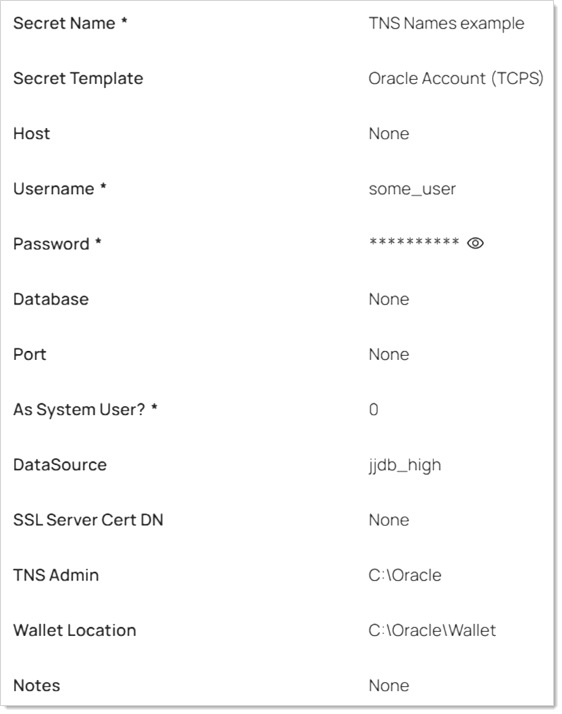
Thus, you can use the tnsnames.ora file as an alternative way to specify a connection string. First, put the directory of the tnsnames.ora file in the “TNS Admin” field. Second, format the contents of tnsnames.ora as <ALIAS> = <CONNECTION STRING>. Paste the desired alias from inside the tnsnames.ora files in the DataSource field of the secret. For example, a file at C:\Oracle\tnsnames.ora might contain the following:
jjdb_high = (description= (retry_count=20)(retry_delay=3)(address=(protocol=tcps)(port=1522)(host=adb.us-ashburn-1.oraclecloud.com))(connect_data=(service_name=g62a2e091eede11_jjdb_high.adb.oraclecloud.com))(security=(ssl_server_cert_dn="CN=adwc.uscom-east-1.oraclecloud.com, OU=Oracle BMCS US, O=Oracle Corporation, L=Redwood City, ST=California, C=US")))
jjdb_low = (description= (retry_count=20)(retry_delay=3)(address=(protocol=tcps)(port=1522)(host=adb.us-ashburn-1.oraclecloud.com))(connect_data=(service_name=g62a2e091eede11_jjdb_low.adb.oraclecloud.com))(security=(ssl_server_cert_dn="CN=adwc.uscom-east-1.oraclecloud.com, OU=Oracle BMCS US, O=Oracle Corporation, L=Redwood City, ST=California, C=US")))
In this example, jjdb_high and jjdb_low are both aliases. To use jjdb_high, paste it into the DataSource field of the secret, and type C:\Oracle in the TNS Admin field. The secret then looks like the following screenshot:
Oracle Account (Walletless)
Oracle has recently announced its support of TCPS without requiring the use of wallets. See Securely Connecting to Autonomous DB Without a Wallet (Using TLS) for details.
Because walletless connections utilize TLS instead of “mutual TLS,” this is potentially less secure than a wallet-based authentication, so you should do your own research before deciding if this is the right approach for you. The advantage of the walletless template is that it allows a secure TCPS connection with the simplicity of the “Oracle Account (Template Ver 2)” template. No wallet files need to be deployed to a server.
The fields on this template are the same as Oracle Account (Template Ver 2) with the addition of the “SSL Server Cert DN” field, which can be found in the TLS connection string. Refer to documentation on your specific Oracle database about how to enable walletless connections, as well as how to obtain the TLS connection string to fill in fields on this secret template.
Oracle Account (Walletless) secrets use the Oracle Account (TCPS) password changer, so RPC setup is the same as for Oracle Account (TCPS). See Oracle Account (TCPS) Secret Template for RPC.


