RDP Proxy Technical Notes
Overview
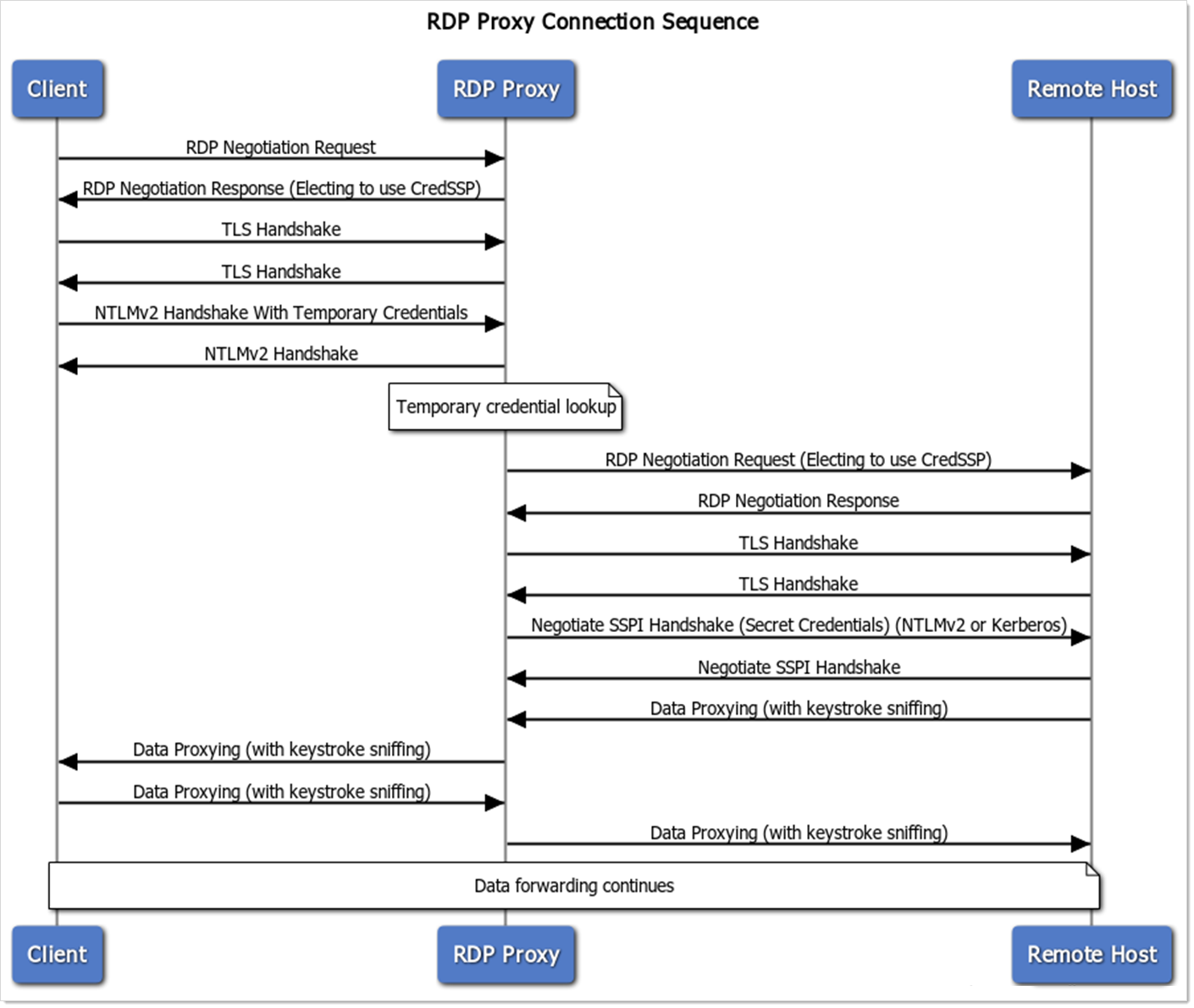
Delinea's RDP Proxy is a feature of Secret Server that allows protection of secret credentials when launching or connecting to remote servers with privileged credentials. The RDP Proxy simulates the RDP connection handshake process when a client connects to retrieve the short-lived temporary credentials that are generated by Secret Server. When it retrieves these credentials, it then queries Secret Server to find the mapped to real secret or privileged credentials to connect to the remote host and begin proxying the data back and forth between the remote host and the client machine.
Requirements
Because of the way in which the RDP proxy retrieves the temporary credentials, the following requirements must be met. Some apply to every operating mode; others apply only to the direct RDP proxy or only to gateway mode.
All Modes
- The RDP Proxy only supports TCP as a transport, not UDP.
- Because the RDP Proxy is pretending to be an RDP host, the certificate that is served from the actual remote host must be trusted. Otherwise, the configuration setting "Validate Remote Certificates" must be disabled. The certificate that is served to the client is the configured "RDP Server Certificate."
- The RDP Proxy is currently unable to support certain niche protocol features. These include: Extended Client Data, DYVNC Graphics Pipeline, Restricted Administrative Mode, and Redirected Authentication.
- The RDP Proxy does not support Windows XP.
Direct RDP Proxy
- Client machines must be able to negotiate using the CredSSP external security provider in the RDP protocol, and network-level authentication (NLA) must be enabled.
- Client machines must be able to use NTLMv2 to connect to the RDP proxy. The RDP proxy needs to retrieve the temporary credentials from the client machine in order to validate them, which is only possible using the NTLMv2 protocol and not Kerberos. This restriction applies to the client-to-proxy leg only. It does not govern how the proxy authenticates to the target host. See RDP Proxy Technical Notes.
Gateway Mode
- The client must use an RDP client that implements the remote desktop gateway protocol. The Microsoft Remote Desktop Connection client (mstsc.exe) on a currently supported Windows release is the validated configuration. Sessions launched with the Secret Server RDP Client do not use the gateway and connect to the direct RDP proxy port instead.
- Client machines must trust the full chain of the gateway certificate. Unlike target-host validation, there is no client-side bypass option.
- Clients authenticate to the gateway using a short-lived signed bearer token issued by Secret Server at launch time. NTLM is not used on the client-to-gateway leg.
- Client machines must run Protocol Handler 6.0.3.51 or later.
- Each distributed engine that serves gateway sessions must advertise the RD gateway capability, which requires a Distributed Engine newer than 8.4.97.0. Older engines continue to serve direct RDP proxy sessions but cannot accept gateway connections.
In both modes, the proxy authenticates to the target host using CredSSP. The SSPI authentication method setting (Negotiate by default) determines whether Kerberos or NTLMv2 is used on that leg. Gateway mode does not change target-host authentication.
Authentication by Connection Leg
Every proxied RDP session consists of two independent connections: the client connects to the proxy or gateway, and the proxy or gateway opens a separate connection to the target host. Each leg authenticates on its own, which is why Kerberos can be offered as an SSPI option even though the direct RDP proxy requires NTLMv2 from clients.
| Leg | Direct RDP proxy | RDP Gateway |
|---|---|---|
| Client to proxy or gateway | CredSSP with NTLMv2. Required; Kerberos is not possible on this leg. | Short-lived signed bearer token over HTTPS. NTLM is not used. |
| Proxy or gateway to target host | CredSSP. The mechanism is set by the SSPI authentication method setting (Negotiate by default). | Same as direct RDP proxy. Gateway mode does not change this leg. |
Connection Sequence
Figure: RDP Proxy Connection Sequence
Performance Testing
The RDP Proxy has undergone performance testing with the following results:
- Infrastructure: We ran the proxy on one Secret Server Web node with 4 vCPUs, 16 GB RAM, Azure D4s_v3 VMs with CPU Intel Xeon 8171M at 2.1 GHz.
- Concurrent sessions: 50 sessions. There was no degradation of performance as the session count rose.
- Session activity: Medium to high. Simulation watched videos and windows screensavers, both of which are graphically intensive and require large amounts of data transfer.
- CPU results: 15-25% CPU usage fluctuation during the 50 concurrent sessions with no observed large spikes.
- Bandwidth results: All sessions collectively used 100-125 Mbps. This will vary wildly based on the type of connecting client and in-session activity.
Gateway Mode
Protocol Surface
Gateway mode implements the subset of the Terminal Services Gateway protocol required to serve the Microsoft Remote Desktop Connection client (mstsc.exe). Data is carried as RDP over an HTTPS tunnel. The UDP datagram transport is not implemented.
Authentication
Clients authenticate to the gateway using a short-lived signed bearer token issued by Secret Server at launch time, carried as a token in the gateway connection request. This removes NTLM from the client-to-gateway leg, which is the compliance outcome of gateway mode. The gateway then establishes a separate connection to the target host using CredSSP, with the mechanism selected by the SSPI authentication method setting — unchanged from direct RDP Proxy. See RDP Proxy Technical Notes.
TLS
The gateway listener accepts client connections over TLS 1.2. Other TLS versions are not offered on the gateway listener. The direct RDP proxy listener, by contrast, accepts TLS 1.0, 1.1, or 1.2.
Reconnect
The gateway preserves the session binding for a short window after a client-side disconnect so that a brief network interruption that triggers an mstsc auto-reconnect does not produce a new session record. Administrative end-session operations from active sessions take precedence over any pending reconnect.
Clients
Any RDP client that implements the remote desktop gateway protocol can connect. Delinea validates gateway mode against the Microsoft Remote Desktop Connection client (mstsc.exe) on currently supported Windows desktop and server releases. Other compliant clients may work but are not part of Delinea's validated configuration.
Performance
Gateway mode adds a TLS handshake and tunnel setup per session. In internal testing, a 4 vCPU / 16 GB Distributed Engine sustains 50 concurrent gateway sessions with CPU and throughput within 5% of direct-mode figures.


