Preventing PII Export in Audit Reports
Overview
You can enable the marking or obfuscation (hiding) of Personally Identifiable Information (PII) in audit exports. This allows for data exportation for review by third parties without including any PII. Marking PII prepares exports for external, separate cleanup, and obfuscation automatically hides or removes it during exportation.
PII includes many internal stored attributes, such as IP addresses, usernames, and email addresses. Metadata fields can be flagged on creation as potentially containing PII, which aids applying the same filtering to user-configured metadata fields. PII can potentially appear in:
- System logs
- Thread logs (RPC, heartbeat, discovery, and others)
- Event logs
- Log4net files
Permissions
Configuring obfuscation and exporting an audit use different permissions:
- Turning Obfuscate Personally Identifiable Information on or off, or changing the obfuscation level, requires the Administer Configuration role permission. See Application Settings.
- Exporting an audit requires no additional permission. Any user who can view an audit page can export it, and the export is marked or obfuscated according to the current setting. For example, exporting a user's audit requires the View Users, Administer Users, or Own User role permission and view rights on that user.
Obfuscation applies to exports only. Users viewing an audit in Secret Server see the PII, surrounded by marker brackets when the setting is enabled.
For details on each permission, see Secret Server Role Permissions List.
Procedure
-
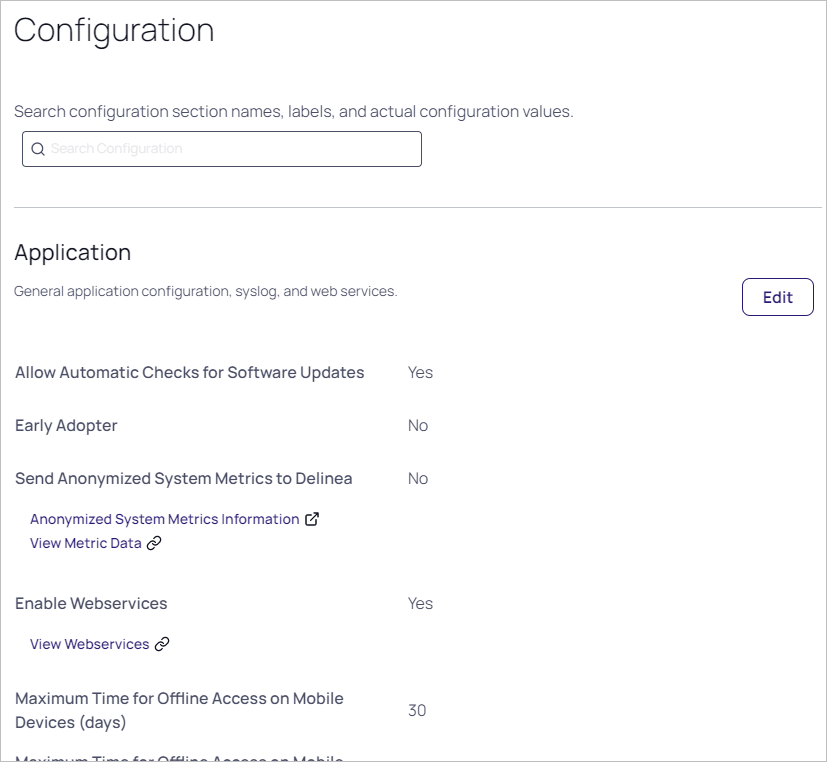
In the Admin Side Panel, search for and click Application. The Application Configuration page appears.
-
Click the Edit button.
-
Scroll down and click to select the Obfuscate Personally Identifiable Information check box. An Obfuscation Level dropdown list appears:

-
Click the Obfuscation Level dropdown list to select one of the following:
- Mark PII and Obfuscate in Audit Exports: Permanently hide or remove all PII in the exported audit report. The following PII data is hashed (replaced with unique, scrambled text that provides no PII): user ID or name, IP address, and folder path. Any other PII data is replaced with
[PII REMOVED]. The hash value allows audit viewers to see that multiple entries belong to a single user without having any specifics on who that user is. - Mark PII: Delimit all PII in easy-to-search-for markers. This allows other applications to process the PII after the export.
- Mark PII and Obfuscate in Audit Exports: Permanently hide or remove all PII in the exported audit report. The following PII data is hashed (replaced with unique, scrambled text that provides no PII): user ID or name, IP address, and folder path. Any other PII data is replaced with
-
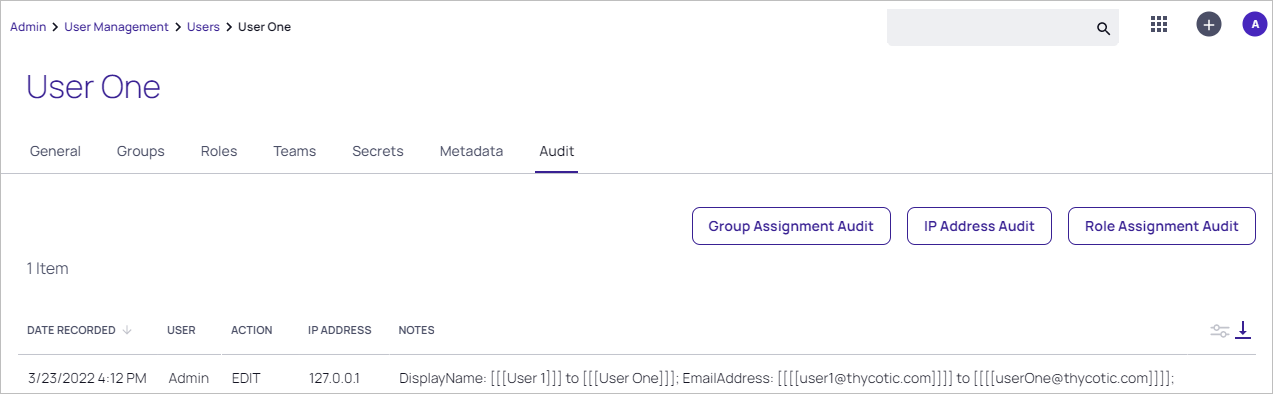
Marked PII is surrounded with square brackets on each side: three for values that are hashed on export, such as user names, and four for values that are removed on export, as seen below:
Obfuscated exports appear as seen in MS Excel below. Note the removed data
[PII REMOVED]and the unique hash values for the user and display names:


