Secret Server Architectural Overview
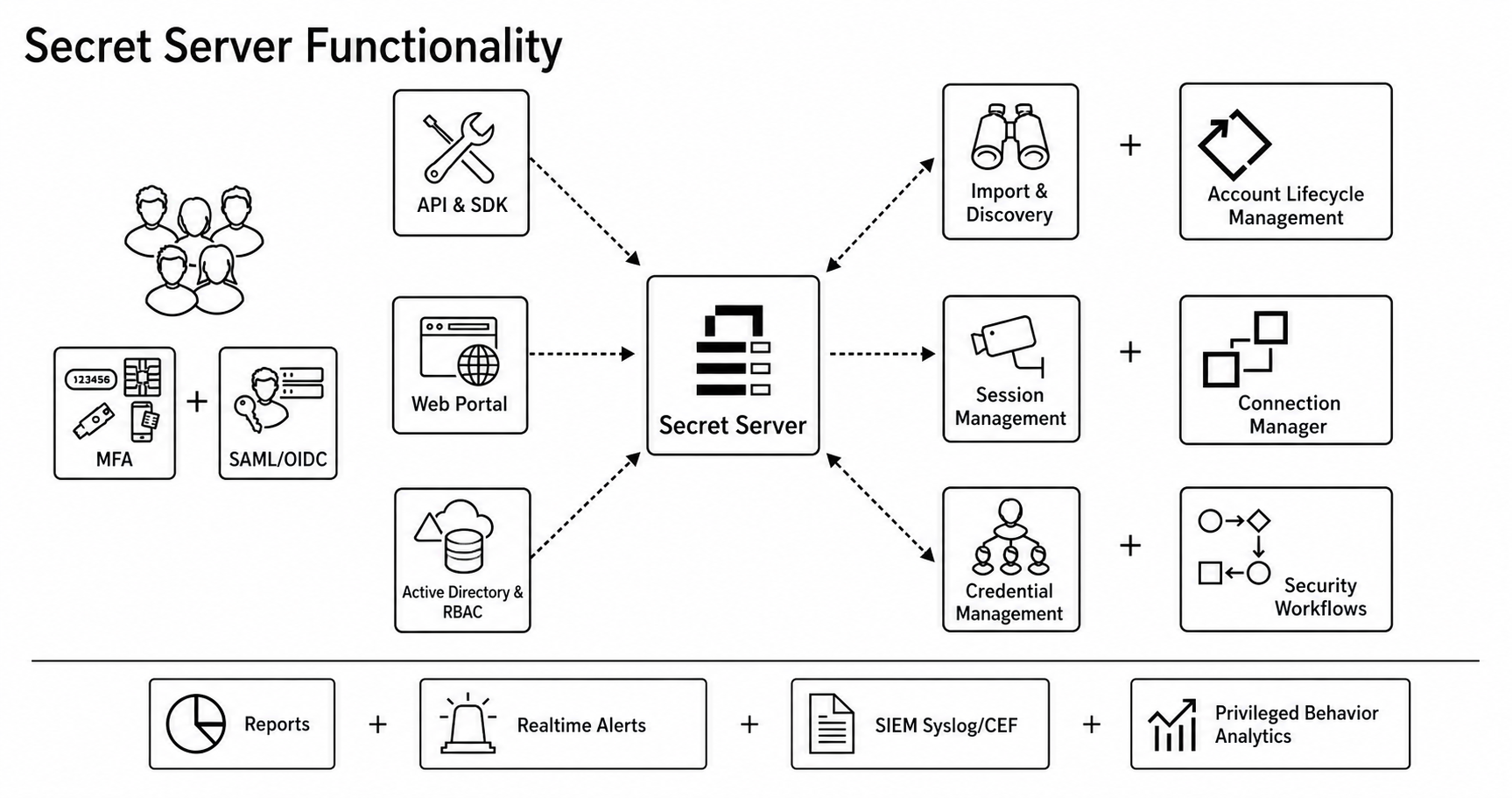
This brief overview is for system architects, security engineers, and IT leaders evaluating, deploying, or operating Secret Server. It covers what Secret Server is made of, how the parts work together, and the decisions you'll need to make as a customer. If you are designing a deployment, briefing a stakeholder, or scoping an integration, this topic is an introduction for you.
Overview
Secret Server is a Privileged Access Management (PAM) platform that vaults privileged credentials, controls who can use them, rotates them on the systems they protect, brokers privileged sessions without exposing the underlying password, discovers unmanaged accounts across your environment, and produces a complete audit trail of all of the above. It is delivered as a Windows-based ASP.NET application backed by SQL Server, with optional remote agents (distributed engines) that extend its reach into network segments the central servers can't directly access. The same architecture runs on-premises and in Delinea's cloud—the difference is who operates the moving parts.
Architecture
Secret Server is a three-tier application with a separable distributed-execution layer bolted onto the side.
Three Tiers
Secret Server consists of three tiers:
- Client tier: Browsers, mobile apps, REST/SOAP API consumers, and the Protocol Handler that powers session launchers. All client traffic terminates at the web servers over HTTPS.
- Application tier: IIS-hosted ASP.NET web nodes serve the UI and APIs. Alongside them, three worker roles handle asynchronous and scheduled work: a background worker (RPC scheduling, heartbeat, discovery, event pipelines, reports, notifications), an engine worker (communication with distributed engines), and a session recording worker (video processing and storage). A message bus—RabbitMQ on-premises, Azure Service Bus in the cloud—connects the web nodes and workers and decouples them from each other.
- Data tier: A SQL Server database is the system of record for all configuration, encrypted secret data, and audit. Session recordings can live in the database or on a UNC file share. An optional HSM holds the master encryption key.
Distributed-Execution Layer
Many operations Secret Server performs—rotating a Windows local password, scanning a remote subnet, proxying an SSH session—must happen close to the target system rather than from the central web tier. Distributed Engines (DEs) are lightweight Windows services installed in those remote network segments. They pull work from a site connector (RabbitMQ, MemoryMQ, or Azure Service Bus), execute it locally against the target, and publish results back. Engines are organized into sites, which are logical groupings tied to network locations; secrets are assigned to a site so the system knows where to dispatch work.
In Secret Server Cloud, every customer environment is by definition remote from Delinea's web tier, so distributed engines are mandatory. On-premises, they are optional but typical for any non-trivial network.
On-Premises Versus Cloud
| Component | On-premises | Cloud |
|---|---|---|
| web servers | Customer-managed IIS | Delinea-managed in Azure |
| Database | Customer-managed SQL Server | Delinea-managed Azure SQL |
| Message bus | RabbitMQ (recommended) | Azure Service Bus |
| Site connectors | RabbitMQ or MemoryMQ | Azure Service Bus |
| Distributed Engines | Optional, recommended for remote networks | Required |
| encryption.config | Customer-managed (critical to back up) | Delinea-managed |
Encryption and the Master Key
Secret Server uses layered encryption—defense in depth—so no single compromise yields plaintext secrets.
- Master Encryption Key (MEK): A randomly generated AES-256 key created at install time and written to
encryption.configin the application directory. The MEK never directly encrypts secret values; it encrypts the per-secret keys that do. It can be protected by file-system permissions only (least secure), DPAPI, DPAPI plus EFS, or—strongly recommended for production—a hardware security module supporting FIPS 140-2. - MEK home:
encryption.configis the most critical file in the deployment. Without it, the encrypted data in the database cannot be decrypted, ever. It must be backed up immediately after install, stored offline in a separate secure location, and—in clusters—be byte-for-byte identical on every web node. - Per-secret keys: Each secret has its own AES-256 key, generated at creation and stored encrypted by the MEK. Field values are encrypted with this per-secret key. Compromise of one secret's key does not extend to others.
- QuantumLock: An optional third layer for ultra-sensitive secrets. A user-specific RSA key pair is generated; the private key is itself encrypted by the user's password. Secrets under QuantumLock can only be decrypted when that specific user authenticates and supplies their password—not even an administrator with full database and MEK access can read them.
- Transport and at-rest layers: TLS for all web traffic, secure connections to site connectors, optional TLS for SQL connections, and optional SQL Server Transparent Data Encryption (TDE) at the database file level. Together with the application-level encryption above, this is what "defense in depth" means in practice.
The Secret Model
A Secret Template defines the shape of a credential type: which fields it has (such as user name, password, target host, notes, or private key), which launchers it supports, which password changer applies to it, and what its default expiration is. Out of the box, templates exist for Active Directory, Windows local accounts, Unix, SQL Server, Oracle, AWS IAM, Azure AD, network devices, and many more.
A Secret is an instance of a template—the actual credential. Internally, it has metadata, encrypted field values, and an encrypted per-secret key tying the two together.
Secrets live in Folders, which are the primary unit of permission inheritance. Secret Policies can be attached to folders to enforce settings (expiration, RPC behavior, approval requirements, MFA on view, and more.) on every secret inside, with optional override behavior. Policy evaluation path: secret-specific setting → applicable policy → template default → system default.
Authentication, Authorization, and Approval
- Authentication: Local accounts (forms auth), Integrated Windows Authentication, SAML SSO, RADIUS, OpenID Connect (Delinea Platform / Azure AD), and LDAP/LDAPS for directory integration. MFA options include Duo, RADIUS tokens, TOTP apps, and FIDO2 hardware keys, configurable per user, group, or globally.
- Two-layer authorization: Roles define what a user can do at the system level—there are roughly 60 role permissions covering administration, configuration, and read/write capabilities across feature areas. Object permissions (folder permissions and secret permissions) define what a user can do to specific items: View, Edit, List (see it exists without seeing values), Owner. Role permissions and object permissions are AND-ed; both must allow an action.
- Approval workflows: Any secret or folder can require approval before access is granted. Approvers can be specific users, groups, the requestor's manager, or chains thereof. The number of required approvals, timeout, and post-approval access duration are configurable. Combined with checkout (single-user exclusive access for a fixed window), approval workflows turn "give Bob the database admin password" into a recorded, time-boxed, reviewed event.
Remote Password Changing (RPC) and Heartbeat
RPC is the feature that turns Secret Server from a passive vault into an active manager of credentials.
Password Changers are the scripts and protocols Secret Server uses to change passwords on target systems—PowerShell remoting for Windows and AD, SSH for Unix and network devices, native database protocols for SQL Server/Oracle/MySQL, REST APIs for AWS IAM, Azure AD, and other cloud platforms. More than a hundred ship in the box, and custom changers can be written in PowerShell, SSH, or SQL.
Dependencies are the second-order problem RPC has to solve. Changing a service account's password breaks every Windows service, scheduled task, IIS app pool, COM+ application, and SQL Agent job that uses it—unless those consumers are updated atomically with the password change. Secret Server's dependency model tracks these relationships and updates them as part of the same RPC operation. Dependency types include the built-ins above plus custom PowerShell or SSH for anything else.
Heartbeat runs on a separate schedule and verifies that stored credentials still authenticate against their target. It detects password drift (someone changed the password outside Secret Server), expired accounts, locked accounts, and connectivity failures, surfacing them before a user discovers the problem the hard way.
Where RPC actually runs. If a secret is assigned to a site, its RPC and heartbeat work flow to the engines in that site via the site connector. If not, work runs on the web node's worker role directly. This is how RPC reaches segregated networks without the web tier needing direct connectivity to every target.
Discovery
Discovery is the inventory engine. It runs scheduled scans against environments—Active Directory, Unix, AWS, Azure, GCP, VMware, plus extensible custom scanners—and pipelines the results through four scanner types: a host-range scanner finds machines, a machine scanner gathers details on each, a local-account scanner enumerates privileged accounts, and an optional dependency scanner finds the downstream consumers of those accounts.
Results land in discovery tables and are then evaluated against import rules, which can auto-create secrets for matching accounts, route them into specific folders, and apply specific templates. The point is to close the gap between "accounts that exist" and "accounts under management" without a human enumerating them by hand.
Like RPC, discovery scans typically run from distributed engines in the relevant site, since the targets are usually behind network boundaries the central tier can't cross.
Privileged Session Management
Three architectural patterns, with increasing levels of credential isolation:
- Launchers (basic): The Protocol Handler—a small Windows client application—fetches the credential from Secret Server, launches the local target client (mstsc.exe, PuTTY, SSMS, and more), and injects the credential. The credential lands on the user's workstation at connection time. Session recording can capture video and screenshots.
- Proxied launchers: SSH and RDP traffic is routed through Secret Server (or a distributed engine) acting as a proxy. The credential is injected at the proxy, never at the client. For SSH, this also enables keystroke capture and command-level restrictions. For RDP, the user's session uses temporary proxy credentials while the real privileged credential stays inside the platform.
- Session Connector (RDS): Targets a Microsoft Remote Desktop Services server with the protocol handler installed. No client-side software on the user's workstation; the launch happens entirely on the RDS host.
Advanced Session Recording (ASR) is an optional agent installed on the target server itself, captures richer session metadata—keystrokes, processes launched, window titles—and makes recordings searchable. This complements rather than replaces video recording.
Automation, Integration, and APIs
- APIs: A modern REST API (JSON, OAuth 2.0) is the recommended integration surface; the legacy SOAP API remains supported for backward compatibility. The SDK for DevOps provides a CLI (
tss) and.NET library for machine-to-machine authentication, with IP-restricted SDK rules and onboarding via client ID plus initialization key. - Event subscriptions: A simple notification system: pick an event type, optionally filter, and route to email, syslog, webhook, or Slack.
- Event pipelines: A more sophisticated workflow engine. Each pipeline has a trigger (an event), filters (conditions), and tasks (actions). Tasks can edit secrets, move them, send notifications, run scripts, call webhooks, or chain into other pipelines. Pipeline policies attach to folders, secret policies, or individual secrets. This is where most non-trivial automation lives.
- External integrations. Native or well-trodden integrations exist for ITSM (ServiceNow, BMC Remedy), SIEM (syslog/CEF to Splunk, ArcSight, and more.), directory services (AD, Azure AD, and LDAP), cloud platforms (AWS, Azure, and GCP), and identity providers (SAML, OIDC, and RADIUS).
High Availability and Clustering
A production deployment is normally clustered. Clustering means multiple web nodes sharing a single SQL database; the message bus coordinates background work between them, and a load balancer fronts the web tier.
Database options: Single instance (simplest), AlwaysOn Availability Groups (the standard HA pattern for SQL Server), or SQL replication with a publisher and read-only subscribers. Background operations only run against the publisher in a replication setup.
RabbitMQ is required for multi-node clustering: MemoryMQ is single-node-only and is appropriate for trial or proof-of-concept installs, not production.
File parity across nodes: encryption.config and the application files must be identical on every web node. Custom password changers, custom report definitions, and configuration overrides need to be propagated as part of any change-management process.
Node loss recovery: With a healthy cluster: user sessions and API access fail over to surviving web nodes; in-flight RPC and discovery work, having been queued in the message bus, is picked up by a remaining worker; engine communication continues as long as at least one engine worker is up. What does not survive: a lost MEK, a corrupted database without backups, or a forgotten encryption.config.
Auditing
Every meaningful action—secret view, edit, create, delete, permission change, password change, login, launcher session, or configuration change—is recorded in the audit tables. Session recordings (video and ASR metadata) are stored alongside the audit record for the launch event. Audit data is retained according to configurable policy and can be streamed to a SIEM via syslog or written to a file. For investigations, the combination of "who viewed this secret, when, with what approval, and what they did during the session" is the answer auditors are looking for.
Architectural Decisions
Boiling the architecture into the choices a customer actually has to make:
- On-Premesis or cloud: Cloud removes the operational burden of running web, database, and message-bus tiers. On-prem gives full control of every component including the master key.
- MEK protection: File-system-only is acceptable only for non-production. Production deployments should use an HSM. DPAPI (or DPAPI + EFS) is the practical middle ground.
- Message bus: RabbitMQ for any production or clustered deployment. MemoryMQ for trials and single-node test labs.
- Distributed engines: Plan a site per network segment that matters: each remote office, each cloud VPC/VNet, each DMZ, each restricted environment with its own firewall rules. In production, place at least two engines per site for redundancy.
- Database HA: AlwaysOn Availability Groups is the default recommendation. Replication is a fit when read-scale matters more than write-availability.
- Identity integration: Pick the IdP path early—SAML, OIDC via Delinea Platform, or Integrated Windows Authentication—because it determines downstream choices about MFA, SSO, and group sync.
- Backup strategy: Three things must be backed up and tested independently:
encryption.config(offline, separate from everything else), the SQL database, and the application configuration and customizations.
Risk at a Glance
| Component | Criticality | What happens if it's lost |
|---|---|---|
encryption.config (MEK) |
Absolute | Permanent, unrecoverable data loss across all secrets |
| SQL Server database | Critical | System offline until restore; no fresh data without recent backup |
| web tier (IIS) | Critical | No user, API, or launcher access |
| RabbitMQ / Service Bus | High | Background work and DE communication stall; clustering breaks |
| Distributed Engines | High (per site) | RPC, heartbeat, discovery, and proxied sessions in that site fail |
| Background Worker | Medium | Scheduled operations stop |
| Engine Worker | Medium | Engines can't be managed or report status |
| Session Recording Worker | Medium | Recordings queue up unprocessed |
| Protocol Handler (client) | Per-user | Launchers fail for that user only |


