
Viewing a TOTP for a Web Secret
You are viewing documentation for an older version of Secret Server. If you are using Secret Server Cloud visit the current version of this documentation here. If you are using Secret Server On-Premises choose the version that matches yours from this list.
For release dates, end-of-support timelines, and upgrade guidance, see the Secret Server Product Lifecycle page.
For release dates, end-of-support timelines, and upgrade guidance, see the Secret Server Product Lifecycle page.
To view or copy the TOTP generated for an account:
-
Navigate to and open the desired secret.
-
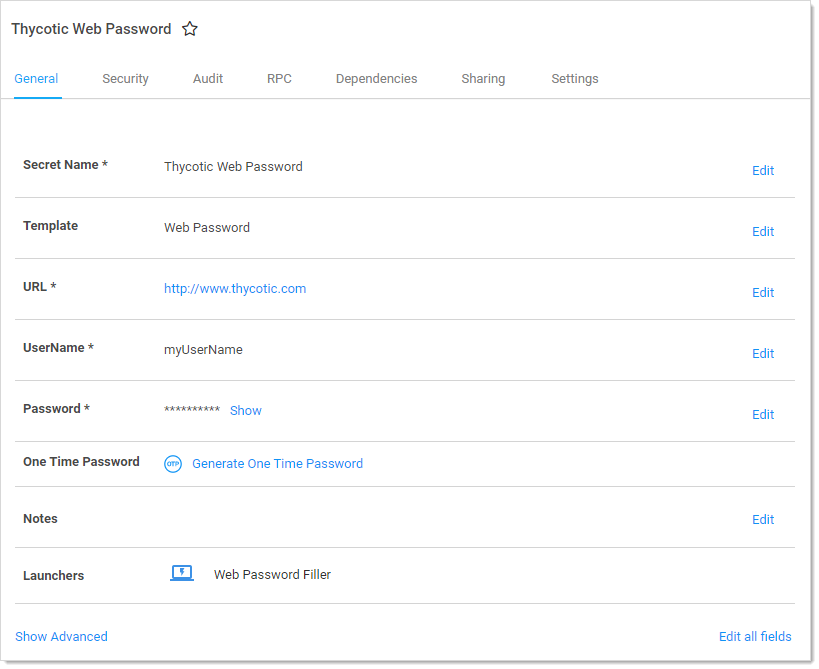
Click the General tab:
-
Click the Generate One Time Password link next to the One Time Password setting.
-
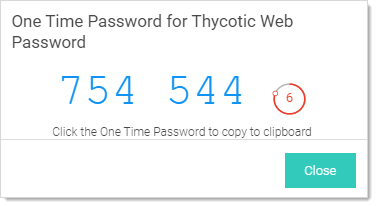
A dialog box appears with an OTP:
-
Click the OTP to copy it to the clipboard.
-
Click the Close button.
The "Generate One Time Password" link also appears on the preview pane when you click a secret on the All Secrets page.


